
Sessions panel
The dashboard’s Sessions page (/sessions, in the sidebar) shows every agent session the daemon is running, one tab per session, with its live transcript and a composer. The Mac app’s Sessions window lists the sessions of every daemon you have — local and remote — and opens each one here.
A session is an agent CLI session, identified by the CLI’s own session ID (Claude Code’s session, Codex’s thread), not by the issue: a run that resumes the same session keeps its tab. In the first seconds of a run, before the CLI has reported its ID, the session is addressed by itervox’s run ID.
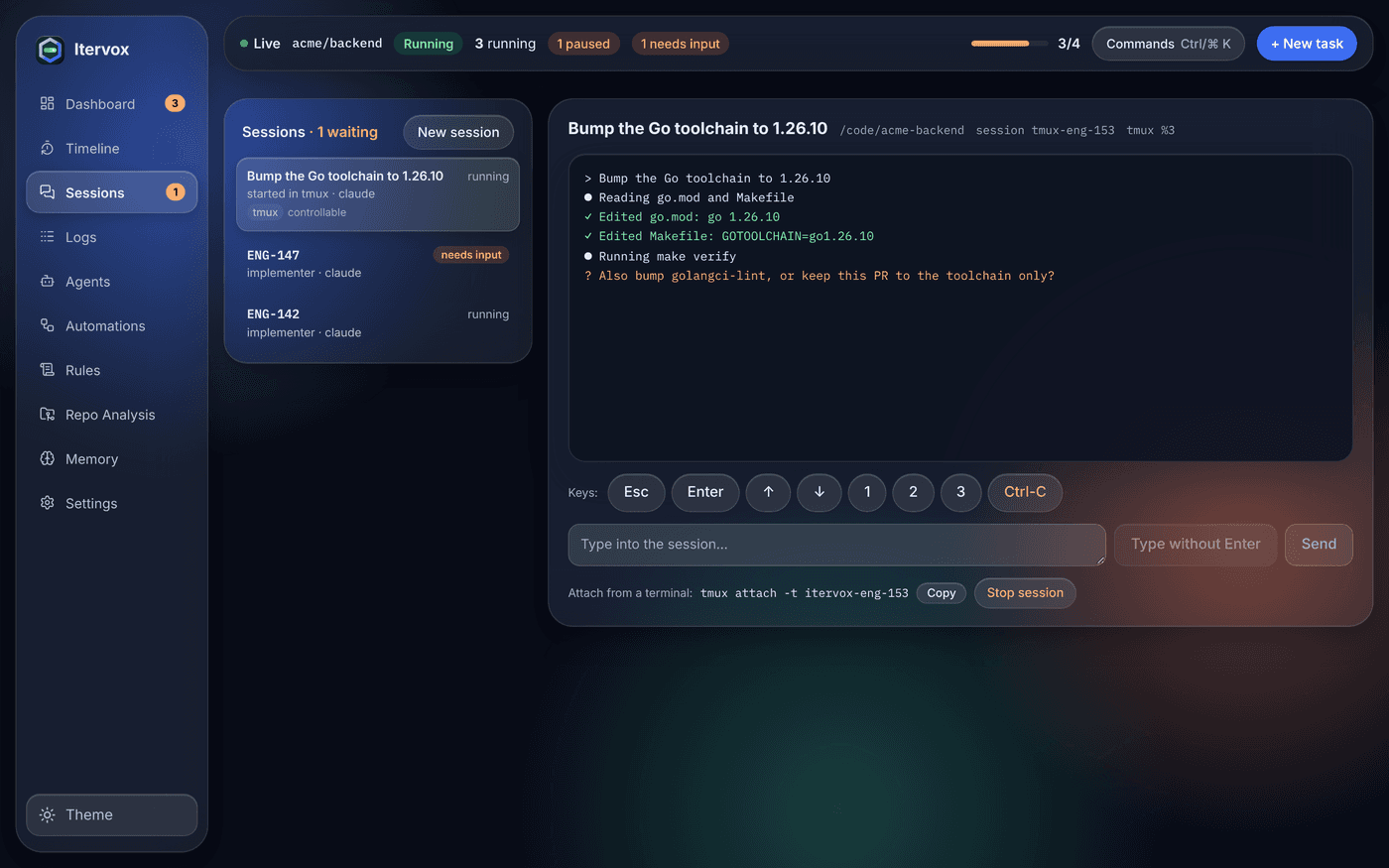
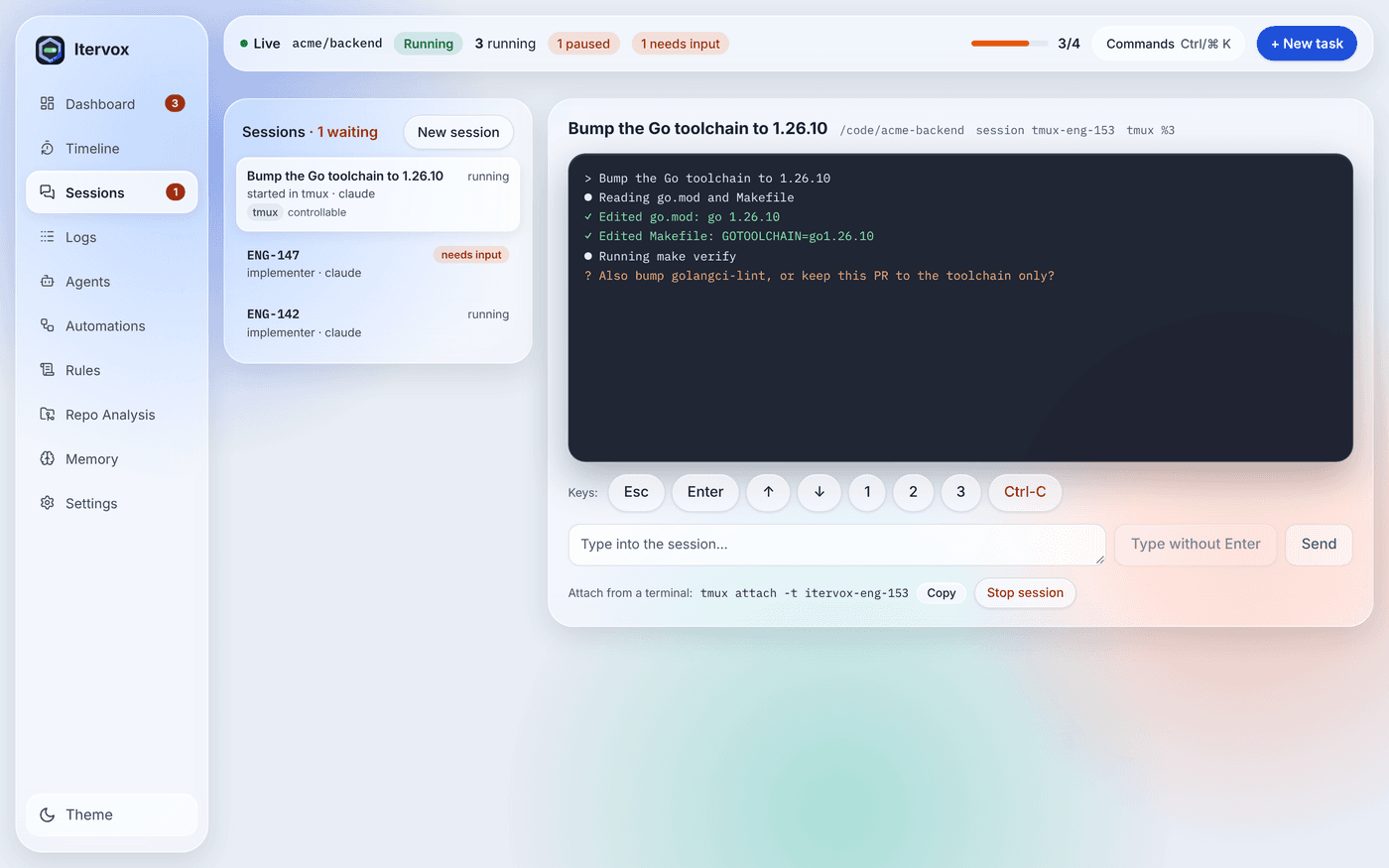
Each running itervox agent run has a tab: the issue, its profile, backend and SSH host. Sessions itervox started in tmux (New session) have a tab too. Sessions waiting for input are badged needs input and listed first, then sessions whose reply was received and are resuming, then running sessions, oldest first. Sessions started by hand come last, greyed and labelled started outside itervox, most recent first. The sidebar’s Sessions icon shows how many are waiting.
Move between tabs with the arrow keys, Home and End. The selected tab is in the address (/sessions?id=<session>), so a link opens that session directly.
Transcript
Section titled “Transcript”For an itervox run, the tab shows the issue’s live log — the same stream as the Logs page — following the bottom as the agent works. For a session started by hand, it shows the CLI’s own transcript: user and agent messages, tool calls by name and abbreviated tool results, newest at the bottom, re-read every few seconds. Load earlier messages pages further back. The daemon reads the transcript file itself and passes every text through the same secret redaction as its logs; thinking blocks, sub-agent sidechains and the CLI’s own context messages are left out.
Replying and messaging
Section titled “Replying and messaging”What the composer does depends on the session:
-
Waiting for input — the agent’s question, and a reply box. Reply & Resume Agent sends your answer through the usual input-required path (
POST /api/v1/issues/{identifier}/provide-input): the same session resumes with your reply. Withagent.inline_input: trueyou reply on the tracker instead. -
Running — a message box. A message is an extra instruction for the agent while it works (“also update the docs”, “stop and summarise”). It is sent with
POST /api/v1/sessions/{id}/messageand reaches the session one of two ways:- Live — a local Claude Code worker with
agent.live_steering: true: the turn runs with--input-format stream-json, and the message is written into the running turn as a user message. The agent reads it while it works. - On resume — Codex (
codex exectakes no input while it runs), SSH workers, and Claude without live steering: the message waits for the current turn to end, then the same session is resumed (claude --resume <id> -p,codex exec resume <id> -) with your message as the prompt. Messages that arrive during one turn are delivered together.
Each message shows where it is: queued, delivered live, delivered on resume, or not delivered with the reason — the run ended (finished, failed, or stopped to wait for input) before it could be delivered.
Delivered messages are also kept with the run once it finishes: the run’s detail on the Timeline lists them with their time and delivery path (redacted, at most the newest 20, each cut to 1 KiB), next to the run’s prompt version. Text typed into a tmux pane is not recorded.
- Live — a local Claude Code worker with
The composer says which delivery applies to the selected session.
Above the message box, one-click steering chips (“Prove it works”, “Fix the root cause”, “Smallest change”, “Reproduce first”, “Explain the number”, “Subtract before you add”) send a short, documented steering message the same way. The issue detail’s Steer the run box has the same chips while the issue runs. The list is configurable with sessions.steering_phrases; see Steering phrases.
Live steering
Section titled “Live steering”Live steering is off by default. Turn it on in WORKFLOW.md:
agent: live_steering: trueIt changes how every local Claude turn is started: the prompt goes to the CLI as the first stream-json message on its stdin, and stdin is closed when the turn’s result arrives, so the CLI finishes and exits as before. If agent.command (or a profile’s command) is a wrapper script that reads its stdin to the end before it starts Claude, keep live steering off: in streaming mode stdin stays open until the turn ends.
Sessions started by hand
Section titled “Sessions started by hand”Claude Code and Codex sessions you start yourself in a terminal on the daemon’s host are listed too, read-only. The daemon finds them in the CLIs’ own transcript directories:
- Claude Code:
~/.claude/projects/<encoded directory>/<session id>.jsonl(under$CLAUDE_CONFIG_DIR/projectswhen that is set); - Codex:
~/.codex/sessions/YYYY/MM/DD/rollout-<time>-<session id>.jsonl(under$CODEX_HOME/sessionswhen set), both the current layout with asession_metaheader and the earlier one.
These are the CLIs’ private file formats, not APIs. The daemon reads them tolerantly — it skips records it does not know — and if a future CLI release changes the layout, sessions simply stop appearing rather than showing garbage.
What is listed (privacy). Only sessions written to within the last 24 hours, and — by default — only sessions whose working directory is inside the project: the directory of WORKFLOW.md, plus any sessions.external_roots. Sessions from unrelated directories are never read or shown unless you set sessions.external_scope: all. Itervox’s own sessions are never listed as hand-started: not its running or waiting runs, and nothing under its workspace root. A remote daemon lists the sessions on its own host. Turn discovery off with sessions.external: false (see Configuration → sessions). Transcripts are served only to clients holding the daemon’s API token, like logs.
Still running? A hand-started session’s tab says running while the CLI that started it may still be running — hover it, or open it, to see why — and exited once it is not. Either way the session stays read-only. The daemon decides this without touching the process — it only inspects: on Linux it reads /proc (each claude or codex process’s working directory and open files); on macOS it runs ps and lsof on your own processes, which needs no privacy permission. A session counts as running when:
- a
claude/codexprocess has its transcript open, or was started with its session ID (for exampleclaude --resume <id>); - a
claude/codexprocess is running in the session’s directory — Claude Code does not keep its transcript open, so itervox cannot tell which of several sessions in that directory the process belongs to and assumes it might be this one; - the process list could not be read; or
- the transcript was written to within the last two minutes.
When in doubt, it is treated as running. Quit the CLI (or wait for it to finish) and the tab becomes exited within a few seconds.
Sessions in tmux
Section titled “Sessions in tmux”Itervox can show and type into an agent CLI that runs inside tmux: sessions you start by hand in a tmux pane (opt-in), and sessions it starts in tmux itself with New session. It does this only through tmux’s own commands — a paste buffer and key events — never by writing to a terminal device.
Controlling a session you run in tmux
Section titled “Controlling a session you run in tmux”Turn it on in WORKFLOW.md (read at startup):
sessions: tmux_control: trueThen run claude (or codex) inside a tmux pane in the project directory. On every discovery pass (every 15 s) the daemon lists tmux’s panes and matches a hand-started session to the pane its CLI runs in: the claude/codex process the liveness check found must be the pane’s own process or a descendant of it, and the pane’s current directory must be the session’s. Only sessions the panel already lists (the privacy scope above) are ever matched. When several sessions of one directory point at the same process, the most recently written one gets the pane. The tab shows a tmux badge with the pane (session:window.pane) and, when it is controllable, controllable.
A controllable session’s tab shows the pane’s screen instead of the transcript — captured as plain text about once a second while the tab is visible — with:
- a text box: Send pastes the text (as a bracketed paste) and presses Enter; Type without Enter only pastes it;
- key buttons: Esc, Enter, ↑, ↓, 1, 2, 3 (for a CLI’s numbered permission prompt) and Ctrl-C (asks first). The daemon accepts only Enter, Escape, Up, Down, Left, Right, Tab, C-c and the digits 1–9.
Before every write the daemon checks again that the pane still exists and still runs that session’s process; if not, the write is refused (409 pane_gone). Without tmux_control, a session in tmux is still badged but stays read-only, and its tab says: Run claude inside tmux and enable sessions.tmux_control to control it from here.
Live terminal
Section titled “Live terminal”On Linux and macOS, a controllable session’s screen is a real terminal: the daemon runs tmux attach-session inside a pseudo-terminal it owns and streams it to the panel over a WebSocket, where xterm.js draws it — colours, the cursor, live output with no polling, and a size that follows the panel. Snapshot view switches back to the plain-text screen above (and Live terminal to the terminal again); the snapshot view and the composer below stay available either way.
What you get depends on your token’s scope:
| Scope | Live terminal |
|---|---|
viewer | None: the snapshot view only. |
operator | Read-only (tmux attach-session -r): you watch the session; nothing you type reaches it — the daemon drops it before tmux, so even tmux’s own key bindings cannot reach another session. |
admin | Read-only, unless sessions.terminal_write is on: then every key you type goes to the session, as at your own keyboard. |
Typing into the terminal is off by default. Turn it on in WORKFLOW.md (read at startup):
sessions: terminal_write: trueThe terminal reaches exactly the sessions the screen and keys reach: the ones itervox started with New session, and a hand-started one only in a matched pane with sessions.tmux_control on. Detaching (closing the tab, switching sessions, Snapshot view) ends only the attach: the tmux session keeps running. A read-only attach still counts as a tmux client, so tmux may size the window to the smallest attached client. Each attach and detach is logged (sessions: terminal attached / detached, with the session, the mode and the token) and recorded in the event feed as terminal_attached / terminal_detached (reason read_only or read_write) — never what was typed or drawn. At most 16 live terminals are open on one daemon at a time. See Security → The live terminal for how the socket is authenticated.
The live terminal is not available through the hub (open the project’s own dashboard) or on Windows, where tmux does not run: the snapshot view is shown instead.
New session
Section titled “New session”New session (top of the tab list) starts an agent in a new tmux session on the daemon’s host. Choose the agent (Claude Code or Codex), the folder — the project folder (default) or one of itervox’s workspaces; a folder outside the project and the workspace root is refused — an optional profile and an optional first prompt. The daemon runs the interactive CLI (no -p, no stream-json) in tmux new-session -d -s itervox-<id> with:
- the profile’s command when one is chosen, else
agent.command, when its binary is that agent; otherwise the agent’s own binary (claude/codex) — a wrapper script is not used, since it would usually run the CLI headless; - the profile’s
permission_mode, else the confining default:--permission-mode acceptEditsfor Claude,--sandbox workspace-writefor Codex (bypassmaps to the usual skip/bypass flags); - the first prompt as the CLI’s positional argument.
These sessions are itervox’s (tab detail started in tmux): controllable whatever sessions.tmux_control says, with the attach command (tmux attach -t itervox-<id>) and a copy button, so you can take over in a terminal, and Stop session / Force stop (see Stopping a session). They do not count toward max_concurrent_agents; at most 8 run at once. When you quit the CLI the tmux session ends and the tab goes away. They survive a WORKFLOW.md reload and a daemon restart.
After a daemon restart
Section titled “After a daemon restart”Itervox tags each session it starts with tmux user options: @itervox-project (the absolute directory of the WORKFLOW.md), @itervox-backend, @itervox-profile, @itervox-cwd and, when guardrails were prepared for it, @itervox-guarded. Nothing is written under .itervox/. When the daemon starts, and on every discovery pass after that (every 15 seconds), it lists the tmux sessions and re-adopts as its own each one whose name is itervox-<id> and whose @itervox-project is this daemon’s project directory — never by name alone, so a same-named session without the tag, or one another project’s daemon started, stays a hand-started session. Re-adoption respects the cap of 8. A re-adopted session is controllable and stoppable again, with its attach command; its tab says re-adopted after restart and its controls say Started by itervox (re-adopted after restart).
Guardrails of a re-adopted session: its shims and pre-push hook were prepared by the previous daemon process, and the token they use to reach the daemon lived only in that process’s memory. The hooks still apply locally — no force push, deletion or tag push, no push to a protected branch, no self-merge, deploy commands refused — but the new daemon rejects their token, so their refusal reports do not reach the dashboard, and a push that guardrails.lanes must report (a second_opinion or human lane change) is refused, as a failed lane report always is. The tab shows Guardrails from the previous daemon run when this applies. Stop the session and start a new one for fresh guardrails. Guardrails are never weakened for an adopted session.
Stopping a session
Section titled “Stopping a session”Stop session (admin token; asks first) depends on who started the session:
- A session itervox started (including a re-adopted one): itervox presses the CLI’s interrupt — Ctrl-C twice, 0.4 s apart, for Claude Code; Ctrl-C once for Codex — then waits up to 5 seconds for the tmux session to end, and runs
tmux kill-sessionif it is still there. The result is stopped (the CLI quit) or killed. Force stop runstmux kill-sessionat once. - A session started by hand, in a tmux pane, with
sessions.tmux_controlon: Stop presses the same interrupt keys and waits up to 5 seconds for the CLI’s process to exit. It never kills a tmux session or pane itervox did not start: a CLI that ignores Ctrl-C keeps running (interrupted). There is no Force stop (403 not_owned). - Any other session started by hand: itervox does not stop it (
403 not_controllable). A running one’s tab says how: Stop it in its own terminal: Ctrl-C, or kill <pid>.
Every stop is logged (sessions: session stopped with the session, backend, mode and outcome; each key as sessions: tmux send) and recorded in the event feed as session_stopped (outcome stopped, killed or interrupted).
In the Mac app’s Sessions window, New session… under a daemon opens its dashboard at this form.
Opening a session in a terminal
Section titled “Opening a session in a terminal”The desktop app’s Sessions window has Open in Terminal on each tmux session it may attach to: the sessions started with New session, and sessions started by hand in tmux while sessions.tmux_control is on. It opens the system terminal running tmux attach -t itervox-<id> — over ssh -t <host> for a remote daemon — so you take over the session yourself. The app attaches; it does not start the CLI. The daemon still owns the session, the dashboard (and the phone and Slack) keep working on it, and closing the terminal only detaches: tmux keeps it running. A hand-started session without sessions.tmux_control has no such action.
When tmux is not installed
Section titled “When tmux is not installed”If tmux is not on the daemon’s PATH, the panel stays read-only for tmux: a banner at the top and the composer of a session started by hand both say tmux not found — install it to control sessions from here, with the install command for the daemon’s platform (brew install tmux on macOS, sudo apt install tmux or your distribution’s package manager on Linux) and a copy button, and New session is disabled. Every tmux write is refused with 409 tmux_unavailable. The daemon looks for tmux again on every discovery pass, so installing it lifts the warning within seconds, without a restart. The Mac app’s Sessions window shows the same warning under that daemon.
Security
Section titled “Security”Anyone holding the dashboard’s API token can type into your opted-in tmux sessions — and into every session started with New session — as if at your keyboard, including answering an agent’s permission prompts. Keep sessions.tmux_control off on a daemon whose token is shared, and treat the token like a shell login. Every write is audited: the daemon logs sessions: tmux send at info level with the session ID, the pane, the kind (text or key) and the size in bytes — never the text itself — and counts it in the itervox_tmux_sends_total{kind} metric. The screen is served as the pane shows it — unlike transcripts it is not redacted — and only to clients holding the token.
A read-write live terminal is a remote shell. With sessions.terminal_write on, an admin token can type anything into the attached session, and from there into tmux itself (a new window is a shell on the daemon’s host). Keep it off unless the admin token is yours alone. Without it the live terminal is read-only for every scope.
What itervox writes to
Section titled “What itervox writes to”Itervox writes to the agent processes it started — the stdin of the process this daemon started for a run, or the prompt of that run’s next resumed turn — and, through tmux only, to sessions running in a tmux pane: ones it started with New session, and hand-started ones you opted in with sessions.tmux_control — by tmux’s paste buffer and key events, or by the live terminal’s tmux attach-session client, which runs in a pseudo-terminal the daemon itself opened. It never writes to a terminal device, never pushes bytes into another terminal’s input, and never uses macOS Accessibility or AppleScript automation to drive another app. A static test (TestNoWritesToProcessesItervoxDidNotStart) fails the build if code that could appears, if any package but internal/tmuxctl runs tmux, names its write commands (attach-session among them) or opens a pseudo-terminal, or if internal/tmuxctl runs anything but tmux. A session started by hand is only read — its transcript file and the process list — and another static test (TestExternalSessionInspectionIsReadOnly) keeps that code free of writes, signals and any command but ps and lsof.
GET /api/v1/sessions— the sessions, in panel order (owner: "external"for sessions started by hand).POST /api/v1/sessions/{id}/message— message a running session, or type into a controllable tmux session ({text, submit}).GET /api/v1/sessions/{id}/transcript— a page of a hand-started session’s transcript.GET /api/v1/sessions/{id}/screenandPOST /api/v1/sessions/{id}/keys— a controllable session’s screen and keys.POST /api/v1/sessions/{id}/terminal/ticket({mode: "read"|"write"}) andGET /api/v1/sessions/{id}/terminal?ticket=…— the live terminal: a single-use ticket, then its WebSocket.POST /api/v1/sessions— New session.POST /api/v1/sessions/{id}/stop— stop a session ({force}; returns{id, outcome});DELETE /api/v1/sessions/{id}is the same as a force stop.