
Configuration
Itervox is configured entirely through a single WORKFLOW.md file in your project directory. The file has two parts: a YAML front matter block (between --- delimiters) that controls all runtime behaviour, and a Liquid template body that becomes the prompt sent to the agent for each issue.
Run itervox init in your project directory to generate a starter file for Linear or GitHub.
File format
Section titled “File format”---itervox_schema_version: 2
tracker: kind: github api_key: $GITHUB_TOKEN project_slug: owner/repo active_states: ["todo"] completion_state: "in-review"
polling: interval_ms: 60000
agent: max_turns: 60 max_concurrent_agents: 3 turn_timeout_ms: 3600000
workspace: root: ~/.itervox/workspaces/my-project
hooks: after_create: | git clone [email protected]:owner/repo.git . before_run: | git fetch origin main && git checkout main && git reset --hard origin/main
server: port: 8090---
You are an expert engineer working on the codebase.
## Your issue
**{{ issue.identifier }}: {{ issue.title }}**
{% if issue.description %}{{ issue.description }}{% endif %}
Issue URL: {{ issue.url }}
{% if issue.comments %}## Comments{% for comment in issue.comments %}**{{ comment.author_name }}**: {{ comment.body }}{% endfor %}{% endif %}
## Steps
1. Explore the codebase relevant to this issue.2. Create a branch: `git checkout -b {{ issue.branch_name | default: issue.identifier | downcase }}`3. Implement the change.4. Run tests and lint.5. Commit and open a PR.Everything after the closing --- is the Liquid prompt template. See Liquid template variables for all available variables.
tracker
Section titled “tracker”Controls which issue tracker Itervox polls and how issue states are mapped.
| Field | Type | Default | Description |
|---|---|---|---|
kind | string | required | Tracker backend. "linear" or "github". |
endpoint | string | https://api.linear.app/graphql | GraphQL endpoint (Linear only). Omit for GitHub — the client uses the GitHub API automatically. |
api_key | string | required | API token. Use $VAR_NAME to read from an environment variable (recommended). |
project_slug | string | required | For Linear: the project slug from your Linear URL (e.g. "ENG"). For GitHub: "owner/repo". |
active_states | string[] | ["Todo", "In Progress"] | Issue states Itervox actively polls and dispatches agents for. |
terminal_states | string[] | ["Closed", "Cancelled", "Canceled", "Duplicate", "Done"] | Issue states that are complete. Issues in these states are not re-dispatched. |
working_state | string | "In Progress" | State Itervox transitions an issue to when an agent is dispatched. Empty string = no transition. |
completion_state | string | "" | State Itervox transitions an issue to after the agent finishes successfully (e.g. "In Review"). Empty string = no transition. When set, the issue leaves active_states so it is not re-dispatched. |
backlog_states | string[] | ["Backlog"] (Linear), [] (GitHub) | States shown as the leftmost column(s) on the Kanban board. Issues in backlog states are displayed but not dispatched. |
failed_state | string | "" | State to move an issue to when agent.max_retries is exhausted. When empty, issues are paused in the dashboard instead of transitioning. |
GitHub note: GitHub Issues does not have built-in workflow states. Itervox simulates states using labels. Create labels in your repository settings that match the values you configure (e.g. create a label named todo, another named in-review).
# Linear exampletracker:  kind: linear  api_key: $LINEAR_API_KEY  project_slug: ENG  active_states: ["Todo", "In Progress"]  terminal_states: ["Done", "Cancelled", "Duplicate"]  completion_state: "In Review"  backlog_states: ["Backlog"]  failed_state: "Failed"
# GitHub exampletracker:  kind: github  api_key: $GITHUB_TOKEN  project_slug: owner/repo  active_states: ["todo"]  terminal_states: ["done", "cancelled"]  completion_state: "in-review"
polling
Section titled “polling”Controls how frequently Itervox checks the tracker for new or updated issues.
| Field | Type | Default | Description |
|---|---|---|---|
interval_ms | int | 30000 | Polling interval in milliseconds. |
polling: interval_ms: 60000 # check every minuteworkspace
Section titled “workspace”Controls where Itervox creates per-issue working directories and how they are managed.
| Field | Type | Default | Description |
|---|---|---|---|
root | string | ~/.itervox/workspaces | Directory where per-issue workspaces are created. Supports ~ expansion and $VAR_NAME env var references. |
auto_clear | bool | false | When true, the workspace directory is deleted only when the issue reaches a terminal tracker state — completion_state after success, or failed_state after retries are exhausted. The workspace persists across retries, input-required pauses, stalls, and pipeline mid-states so chained profiles can share .itervox/handoff/ files on the same branch. Logs live in a separate dir and are unaffected. Compatible with agent.auto_review — the clear is deferred until after the reviewer also completes (v0.2.0 breaking change from the legacy “clear after every successful run” semantics). |
worktree | bool | false | When true, Itervox uses git worktree to create per-issue branches inside a shared clone at root instead of making separate empty directories. Requires a git repository to already exist at root (or clone_url to be set). |
clone_url | string | "" | Git remote URL used to initialise the bare clone when worktree: true and the root directory does not yet contain a git repository. |
base_branch | string | "main" | Branch that new worktrees are created from when worktree: true. |
workspace: root: ~/.itervox/workspaces/my-project auto_clear: true worktree: true base_branch: mainAgent handoff (.itervox/handoff/)
Section titled “Agent handoff (.itervox/handoff/)”When multiple profiles run on the same issue — for example a research profile followed by an implementer followed by a reviewer — they can share structured deliverables via the per-issue workspace’s .itervox/handoff/ directory.
How it works:
- The orchestrator stamps each worker run with an ISO8601 timestamp and computes a canonical handoff path:
.itervox/handoff/<timestamp>_<profile-name>.md. These two values are appended to the worker’s prompt as a## Run Contextblock (fieldsrun.timestampandrun.handoff_path). - Before dispatching any worker, the orchestrator reads every existing
.mdfile in that directory (including.partial.mdfiles), sorts them by filename (chronological because of the ISO8601 prefix), and inlines them into the prompt as a## Prior Agent Handoffsblock. A 30 KB token budget caps the section; if exceeded, the oldest files are dropped with a[earlier handoffs truncated]marker. - The agent’s INSTRUCTIONS.md “Handoff Protocol” section tells it to read the prerendered prior-handoffs block and write its own deliverable to
run.handoff_pathbefore exiting. The orchestrator does not call out to the agent — it relies on the agent following INSTRUCTIONS.md. - If the worker exits with
TerminalFailedorTerminalStalled, the orchestrator renames the most recent matching<timestamp>_<profile>.mdto<timestamp>_<profile>.partial.md. Subsequent agents see partials in their handoff context and can distinguish them from clean deliverables.TerminalInputRequireddoes not mark partial — the agent intentionally paused and may resume.
Git policy: .itervox/handoff/** is committable. itervox init and itervox init --update patch the root .gitignore to whitelist it alongside .itervox/agents/**. Commit the pipeline trail into PRs so reviewers can read the chain.
Filenames are deterministic from run.timestamp and the profile name:
.itervox/handoff/2026-05-26T14-30-45Z_researcher.md.itervox/handoff/2026-05-26T14-42-12Z_implementer.md.itervox/handoff/2026-05-26T14-58-30Z_reviewer.mdProfile names with spaces are slugified ("story writer" → story-writer). An empty profile name falls back to agent.
See the Agent Handoff guide for a worked example chaining three profiles end-to-end.
Controls the agent runner: which CLI to invoke, concurrency limits, timeouts, retry behaviour, and advanced features like SSH dispatch and named profiles.
Core fields
Section titled “Core fields”| Field | Type | Default | Description |
|---|---|---|---|
command | string | "claude" | CLI command used to launch the agent. Can include flags (e.g. "claude --model claude-opus-4-6"). |
backend | string | "" | Explicitly sets the runner backend ("claude" or "codex"). Only needed when command is a wrapper script and Itervox cannot infer the backend from the command name. |
max_concurrent_agents | int | 10 | Maximum number of agent workers running simultaneously across all issues. |
max_concurrent_agents_by_state | map | {} | Per-state concurrency limits that override max_concurrent_agents. Keys are lowercase state names. See example below. |
max_automation_queue_length | int | 100 | Maximum durable automation dispatch entries waiting for capacity or dependency resolution. 0/negative values fall back to the default; the queue is never unlimited. |
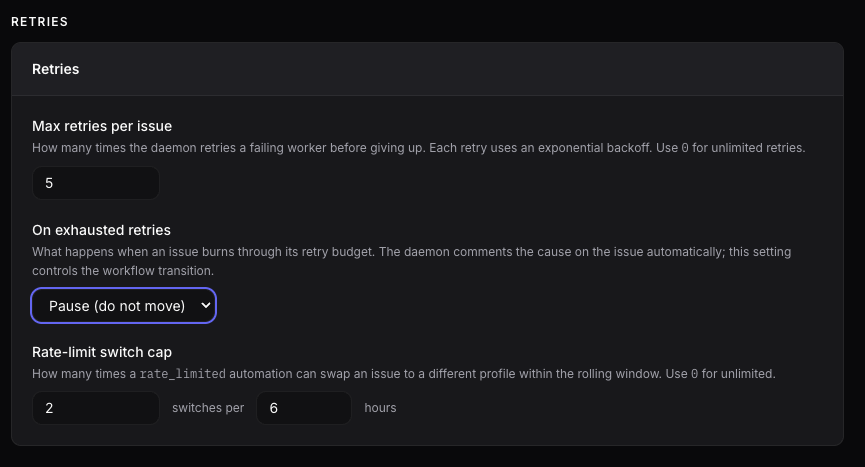
max_retries | int | 5 | Maximum retry attempts before an issue is moved to tracker.failed_state (or paused if failed_state is empty). 0 means unlimited retries. |
max_retry_backoff_ms | int | 300000 | Cap on exponential retry back-off (5 minutes). Back-off progresses as 10s × 2^(attempt-1), capped at this value. 0/negative values fall back to the default; use max_retries to control retry count. |
max_turns | int | 20 | Maximum number of agent turns per session. |
These retry and rate-limit settings are also editable from the Settings dashboard:
Timeout fields
Section titled “Timeout fields”| Field | Type | Default | Description |
|---|---|---|---|
turn_timeout_ms | int | 3600000 | Hard wall-clock limit for an entire agent session (all turns combined). When exceeded, the subprocess is killed and the issue is retried. 0 disables the timeout. |
read_timeout_ms | int | 30000 | Per-read timeout on the subprocess stdout pipe (30 seconds). If no bytes arrive within this window, the subprocess is killed. Catches OS-level pipe hangs before the stall detector fires. |
stall_timeout_ms | int | 300000 | Orchestrator-level inactivity timeout (5 minutes). If no SSE events are produced within this window, the worker context is cancelled and the issue is retried. Operates on the parsed event stream and detects semantic stalls (e.g. agent looping without progress). Set to 0 or less to disable. |
Behaviour fields
Section titled “Behaviour fields”| Field | Type | Default | Description |
|---|---|---|---|
inline_input | bool | false | When true, agent input-required signals are posted as tracker comments; the user replies in the tracker and moves the issue back to an active state to continue. When false (default), the dashboard shows a reply UI that posts the response as a tracker comment before resuming. |
base_branch | string | "" | Remote branch used as the base for git diffs when enriching PR context (e.g. "origin/develop"). When empty, Itervox auto-detects via git symbolic-ref refs/remotes/origin/HEAD, falling back to "origin/main". |
reviewer_prompt | string | built-in | (Deprecated) Liquid template for the legacy reviewer. Prefer reviewer_profile. |
reviewer_profile | string | "" | Name of the agent profile used for code review. When set, the reviewer runs as a regular worker using this profile’s command, backend, and profile files. Enables the AI Review button in the dashboard. |
auto_review | bool | false | When true, automatically dispatches a reviewer worker after each successful agent run. Requires reviewer_profile to be set. As of v0.2.0, this safely coexists with workspace.auto_clear — the clear is deferred until the reviewer also completes. |
max_switches_per_issue_per_window | int | 2 | Maximum times a rate_limited automation can switch an issue to a different profile within the rolling window. 0 for unlimited. This cap limits switching; it is not the trigger condition. |
switch_window_hours | int | 6 | Rolling window size (in hours) for the switch cap. |
switch_revert_hours | int | 0 | TTL (in hours) after which an auto-applied profile/backend switch is reverted on the next poll cycle, returning the issue to its original profile and backend. 0 (default) disables the revert. Operator-set overrides survive — only auto-switches with a recorded AutoSwitchedAt timestamp are eligible. |
rate_limit_error_patterns | string[] | [] | Custom substrings for detecting rate-limit errors in agent stderr. Empty falls back to built-in defaults (rate_limit_exceeded, rate limit, 429, quota, too many requests). |
allow_unchecked_merge | bool | false | When false (default), the merge_pr action refuses to merge on a repo with zero required checks configured (reason unarmed_gate:...) instead of merging with no CI coverage. Set true to merge anyway; the daemon still logs a loud warning. |
agent: reviewer_profile: code-reviewer # use the "code-reviewer" profile for AI reviews auto_review: true # automatically review after each successful run profiles: code-reviewer: command: claude --model claude-opus-4-6 soul_file: .itervox/agents/code-reviewer/SOUL.md instructions_file: .itervox/agents/code-reviewer/INSTRUCTIONS.mdSSH dispatch
Section titled “SSH dispatch”Itervox can distribute agent work across multiple remote hosts via SSH. Each host runs the agent CLI in a separate SSH session.
| Field | Type | Default | Description |
|---|---|---|---|
ssh_hosts | string[] | [] | List of SSH hosts in "host" or "host:port" format. When empty, agents run locally. |
ssh_host_descriptions | object | {} | Optional display labels for ssh_hosts. Keys are host strings, values are user-facing descriptions shown in the dashboard and TUI. |
ssh_strict_host_checking | string | "accept-new" | Default StrictHostKeyChecking mode applied to every SSH worker connection. Valid values: accept-new (TOFU — pin on first contact, reject on mismatch), yes (strict — reject any unknown or changed key), no / off (permissive — accept any key, insecure), ask (prompt — incompatible with BatchMode=yes). Defaults to accept-new so a brand-new host’s key is recorded in ~/.ssh/known_hosts on first contact and any subsequent mismatch is rejected. |
ssh_strict_host_by_host | object | {} | Per-host override for StrictHostKeyChecking, taking precedence over ssh_strict_host_checking. Keys are host addresses (matching entries in ssh_hosts), values use the same set as the default. Use to harden production hosts to yes or temporarily relax a sandbox VM to no. |
dispatch_strategy | string | "round-robin" | How issues are routed to SSH hosts. "round-robin" cycles through hosts in order. "least-loaded" sends each new issue to the host with the fewest active workers. Ignored when ssh_hosts is empty. |
agent: ssh_hosts: - build-host-1.example.com - build-host-2.example.com:2222 dispatch_strategy: least-loaded # Default to TOFU for all hosts; harden production specifically. ssh_strict_host_checking: accept-new ssh_strict_host_by_host: "build-host-1.example.com": yesAvailable models
Section titled “Available models”The available_models field stores the list of models available for each backend. This is auto-populated by itervox init (which queries claude --list-models / codex --list-models) and used by the web dashboard’s profile editor to suggest models in the dropdown.
| Field | Type | Default | Description |
|---|---|---|---|
available_models | map | {} | Map of backend name ("claude", "codex") to a list of model options. Each entry has id (model ID string) and label (human-readable name). |
agent: available_models: claude: - { id: "claude-haiku-4-5-20251001", label: "Haiku 4.5 - Fast" } - { id: "claude-sonnet-4-6", label: "Sonnet 4.6 - Balanced" } - { id: "claude-opus-4-6", label: "Opus 4.6 - Powerful" } codex: - { id: "gpt-5.3-codex", label: "GPT-5.3-Codex - Frontier coding" } - { id: "gpt-5.2-codex", label: "GPT-5.2-Codex - Long-horizon agentic coding" }If available_models is empty or missing, the dashboard falls back to a built-in default list.
Agent profiles
Section titled “Agent profiles”Named profiles let you configure alternative agent commands selectable per-issue from the web dashboard. Each profile must specify a command. In schema 2, profile text lives in files under .itervox/agents/<profile>/; WORKFLOW.md stores references to those files.
| Field | Type | Description |
|---|---|---|
command | string | CLI command for this profile (e.g. "claude --model claude-haiku-4-5-20251001"). |
soul_file | string | Path to SOUL.md, relative to WORKFLOW.md when not absolute. Holds identity, purpose, boundaries, and collaboration style. |
instructions_file | string | Path to INSTRUCTIONS.md, relative to WORKFLOW.md when not absolute. Holds operational rules, checklists, and done criteria. |
backend | string | Explicit backend override for this profile (same as the top-level backend field). |
enabled | boolean | Optional. Disabled profiles stay in config but are hidden from normal selection and dispatch. |
allowed_actions | string[] | Optional daemon-backed actions the profile may invoke: comment, comment_pr, create_issue, move_state, provide_input. |
create_issue_state | string | Required when allowed_actions includes create_issue; the tracker state/column used for follow-up issues. |
SOUL.md is appended before INSTRUCTIONS.md, and both files support the same Liquid bindings as the main WORKFLOW.md prompt. Automation instructions are appended after the selected profile files. agent.profiles.*.prompt is legacy input for itervox init --update; schema 2 rejects it at daemon startup.
The dashboard profile editor edits SOUL.md and INSTRUCTIONS.md separately
and writes those files before refreshing the snapshot.
allowed_actions do not grant shell or tracker access by themselves. They only
allow the daemon to mint short-lived per-run bearer grants for the corresponding
/api/v1/agent-actions/* routes.
agent:  command: claude  max_concurrent_agents: 5  max_turns: 60  turn_timeout_ms: 3600000  read_timeout_ms: 120000  stall_timeout_ms: 300000
  max_concurrent_agents_by_state:    "in progress": 3    "in review": 2
  profiles:    fast:      command: claude --model claude-haiku-4-5-20251001      soul_file: .itervox/agents/fast/SOUL.md      instructions_file: .itervox/agents/fast/INSTRUCTIONS.md    thorough:      command: claude --model claude-opus-4-6      soul_file: .itervox/agents/thorough/SOUL.md      instructions_file: .itervox/agents/thorough/INSTRUCTIONS.md      allowed_actions: [comment, move_state]    input-responder:      command: claude --model claude-sonnet-4-6      soul_file: .itervox/agents/input-responder/SOUL.md      instructions_file: .itervox/agents/input-responder/INSTRUCTIONS.md      allowed_actions: [comment, provide_input]    qa:      command: claude --model claude-sonnet-4-6      soul_file: .itervox/agents/qa/SOUL.md      instructions_file: .itervox/agents/qa/INSTRUCTIONS.md      allowed_actions: [comment, create_issue, move_state]      create_issue_state: Todo
automations
Section titled “automations”Automations dispatch a selected profile when a trigger fires, then layer a small instruction block on top of that profile.
Supported triggers:
croninput_requiredtracker_comment_addedissue_entered_stateissue_moved_to_backlogrun_failedpr_opened— fires when a worker’s PR is detectedrate_limited— fires when a worker run exhausts retries and Itervox classifies the terminal failure as rate-limit-driven. The switch cap limits automated switching; it is not the trigger condition.blockers_resolved— fires when dependency audit observes a previously blocked issue becoming unblocked.
Tracker event triggers are poll-derived, not webhook-derived. The automation
loop runs every 15 seconds. tracker_comment_added compares only the latest
observed comment, so multiple comments between polls collapse to the latest
comment for trigger purposes.
When a trigger cannot start immediately for a retryable runtime reason such as
no_slots, per_state_limit, already_running, input_required,
pending_input_resume, or blocked_by, Itervox records a durable automation
queue entry instead of dropping the attempt. The queue is capped by
agent.max_automation_queue_length. Saturation pauses recurring/cron/polled
producer intake; one-shot and internal dispatch attempts are rejected and
counted for audit rather than paused. Existing queue entries continue draining
until the queue falls below the low-water mark.
| Field | Type | Description |
|---|---|---|
id | string | Stable automation identifier. |
enabled | bool | Whether the automation is active. |
profile | string | Name of the agent profile to dispatch. |
instructions | string | Small Markdown/Liquid instruction overlay appended after the selected profile files. |
trigger.type | string | Trigger type. |
trigger.cron | string | Five-field cron expression for cron triggers. |
trigger.timezone | string | Optional timezone for cron triggers. |
trigger.state | string | Required for issue_entered_state; the tracker state that must be entered. |
filter.match_mode | string | How populated filters combine: all or any. |
filter.states | string[] | Issue-state filter. For cron automations, leave empty to use backlog and active states. |
filter.states_any | string[] | Alias for filter.states; recommended for blockers_resolved examples to make the source-state policy explicit. |
filter.labels_any | string[] | Match issues with at least one of the listed labels. |
filter.identifier_regex | string | Regex matched against issue identifiers like ENG-42. |
filter.limit | int | Maximum number of issues to queue from one cron tick or event poll batch. |
filter.input_context_regex | string | Only meaningful for input_required; matched against the blocked-agent question text. |
filter.max_age_minutes | int | Only meaningful for input_required; skips blocked entries older than this many minutes. |
policy.auto_resume | bool | For input_required, allows the helper to resume the blocked run via provide_input. For rate_limited, accepted but prefer policy.auto_switch. |
policy.auto_switch | bool | Alias for policy.auto_resume on rate_limited; allows immediate profile/backend switching without a human approval step. |
policy.switch_to_profile | string | Required for rate_limited; profile to use for the switched run. |
policy.switch_to_backend | string | Optional claude/codex backend override for rate_limited switched runs. |
policy.cooldown_minutes | int | Optional cooldown for rate_limited rules on the same issue/profile tuple. Default is 30 when unset. |
policy.move_to_state | string | Optional for blockers_resolved; allows the helper profile to move matching unblocked issues to this state when the profile includes move_state. |
When switch_to_backend is set, the target profile command must be compatible with that backend. Prefer a dedicated Codex profile such as command: codex / backend: codex, or a backend-aware wrapper command.
Dependency readiness and blockers
Section titled “Dependency readiness and blockers”Itervox exposes tracker blockers to the prompt and dashboard, and normal issue dispatch skips Todo issues whose blockers are still non-terminal. That is the deterministic blocker behavior shipped in v0.2.0.
Automation rules can opt into a deterministic blockers_resolved trigger. Core dependency audit detects when a previously blocked issue has no unresolved blockers left; tracker mutation still happens only through an enabled automation whose selected profile is allowed to use move_state.
automations:  - id: qa-ready    enabled: true    trigger:      type: issue_entered_state      state: "Ready for QA"    profile: qa    instructions: |      Run the QA routine for this issue.      Comment the results.      If any required check fails, move the issue to Todo.
  - id: pm-backlog-review    enabled: true    trigger:      type: cron      cron: "0 9 * * 1-5"      timezone: "Asia/Jerusalem"    profile: pm    instructions: |      Review backlog issues for missing clarity and acceptance criteria.      Leave one concise comment summarising what is unclear.    filter:      states: ["Backlog"]      limit: 20
  - id: unblock-backlog-to-todo    enabled: true    trigger:      type: blockers_resolved    profile: pm    instructions: |      All tracked blockers for this backlog issue are terminal.      Move only backlog/Backlog issues to Todo.      Do not move review, in-review, PR-open, or merged issues.    filter:      states_any: ["backlog", "Backlog"]    policy:      move_to_state: "Todo"
For the full mental model, trigger semantics, and examples, see the Automations guide. For runtime behavior, see the Automation Queue guide and Dependency Management guide.
Migrating from schedules: (deprecated)
Section titled “Migrating from schedules: (deprecated)”The legacy schedules: block is still parsed and silently upgraded to equivalent cron automations at startup — but this fallback is deprecated and will be removed in a future release. Itervox logs a warning on startup when a schedules: block is found, with the count of upgraded entries.
To migrate: rewrite each schedules: entry as an automations: entry with trigger.type: cron plus the same cron expression, timezone, profile, and state filter. The legacy format has no instructions: block, so migrated entries start with an empty prompt overlay and can optionally add instructions at migration time.
Shell commands run at lifecycle points in each issue’s workspace. All hooks run in the issue’s workspace directory.
| Field | Type | Default | Description |
|---|---|---|---|
after_create | string | "" | Shell command run after the workspace directory is created, before any agent runs. Typically used to clone the repository. |
before_run | string | "" | Shell command run once per worker invocation, before the first agent turn of that attempt. Typically used to sync the branch (git fetch, git reset). |
after_run | string | "" | Shell command run after each completed agent turn. |
after_run_required | bool | false | When true, a worker whose final after_run hook exits non-zero fails the unit instead of completing it — the hook becomes a per-unit completion gate. |
before_remove | string | "" | Shell command run before the workspace directory is deleted (when workspace.auto_clear: true or on manual removal). |
timeout_ms | int | 60000 | Maximum time allowed for any single hook to complete (60 seconds). |
All hooks run via bash -lc in the issue workspace. Itervox does not inject any per-issue environment variables into hook processes; hooks inherit the daemon’s environment as-is. before_run is intentionally per-attempt, not per-turn, so setup hooks do not wipe agent progress between turns. On an in-place input_required resume, Itervox skips before_run; if the workspace had to be recreated first, the normal setup hooks run again.
By default after_run failures are logged and ignored. Set hooks.after_run_required: true to turn after_run into a per-unit completion gate: a unit whose final after_run hook fails does not complete, regardless of the agent’s own clean exit. Use it to run make test (or any operator-owned verification) as part of the definition of done, complementing the CI-governed merge gate.
Multi-line shell scripts are supported using YAML block scalars:
hooks: after_create: | git clone [email protected]:owner/repo.git . pnpm install --frozen-lockfile before_run: | git fetch origin main git checkout main git reset --hard origin/main after_run: | git status --short before_remove: | tar -czf ../workspace-backup.tgz . timeout_ms: 120000server
Section titled “server”Controls the built-in HTTP server that serves the web dashboard and REST API.
| Field | Type | Default | Description |
|---|---|---|---|
host | string | "127.0.0.1" | Interface the server listens on. Change to "0.0.0.0" to expose on all interfaces. |
port | int | auto-assigned | TCP port. When omitted, Itervox picks an available port and prints it at startup. |
allow_unauthenticated_lan | bool | false | When binding to a non-loopback address, Itervox requires bearer-token auth on every request and auto-generates an ephemeral ITERVOX_API_TOKEN if none is set. Set to true only for trusted-LAN deployments where the daemon is physically unreachable from the public internet. No effect on loopback binds. |
server: host: 127.0.0.1 port: 8090Authentication
Section titled “Authentication”Any non-loopback bind requires Authorization: Bearer <token> on every HTTP request and SSE stream. Itervox reads the token from the ITERVOX_API_TOKEN environment variable; when unset, the daemon generates a random ephemeral token at startup and logs it once. The dashboard prompts for the token on first load and persists it (session-only by default, or via the “Remember” checkbox in localStorage). The GET /health probe is auth-exempt so load balancers and uptime monitors can check liveness without a token.
See the Remote access guide for setting up persistent tokens and reverse-proxy TLS.
Secret resolution
Section titled “Secret resolution”Any string field value that matches the pattern $VAR_NAME (a dollar sign followed by a valid environment variable name) is resolved to the value of that environment variable at startup. This is the recommended way to supply API keys and tokens.
tracker: api_key: $LINEAR_API_KEY # reads process env LINEAR_API_KEYworkspace: root: $ITERVOX_WORKSPACE # reads process env ITERVOX_WORKSPACE.env file loading: Itervox automatically loads environment variables from .env files before reading WORKFLOW.md. The search order is:
.itervox/.env(relative to the current working directory).env(relative to the current working directory)
Only the first file found is loaded. Existing environment variables (already set in the shell) are never overwritten. The .itervox/.env file is created and git-ignored automatically by itervox init.
A typical .itervox/.env looks like:
LINEAR_API_KEY=lin_api_xxxxxxxxxxxxGITHUB_TOKEN=ghp_xxxxxxxxxxxx.itervox project files
Section titled “.itervox project files”itervox init creates .itervox/.gitignore, .itervox/.env, and starter profile files. Commit .itervox/agents/**: those files are project agent definitions. Do not commit .itervox/.env, .itervox/HEARTBEAT.md, logs, runtime queue files, or other generated daemon state.
On startup the daemon writes .itervox/HEARTBEAT.md atomically with the current workflow path, schema version, dashboard URL, tracker/project, capacity, automation queue pressure, dependency audit summary, input-required count, retry count, and last notable error. Agents can read it when they need current daemon state; it is generated runtime state, not prompt text.
Liquid template variables
Section titled “Liquid template variables”The body of WORKFLOW.md (everything after the closing ---) is a Liquid template. Itervox renders it once per issue dispatch to produce the agent’s prompt.
Issue variables
Section titled “Issue variables”| Variable | Type | Description |
|---|---|---|
issue.identifier | string | Tracker-specific issue ID (e.g. "ENG-42" for Linear, "#123" for GitHub). |
issue.title | string | Issue title. |
issue.description | string | Issue body/description. May be empty — use {% if issue.description %} to guard. |
issue.url | string | Full URL to the issue in the tracker. |
issue.branch_name | string | Suggested git branch name derived from the issue (e.g. "eng-42-fix-login-bug"). May be empty for GitHub issues. |
issue.labels | string[] | Labels attached to the issue. Iterable with {% for label in issue.labels %}. |
issue.priority | string | Priority label (Linear: "urgent", "high", "medium", "low", "no priority"; GitHub: empty string). |
issue.comments | object[] | Comments on the issue. Each comment has author_name, body, and created_at fields. |
id | string | Internal tracker issue ID. |
state | string | Current issue state (e.g. "Todo", "In Progress"). |
blocked_by | object[] | List of blocking issues. Each entry has id, identifier, and state fields. |
created_at | string | Issue creation timestamp (ISO 8601). |
updated_at | string | Issue last update timestamp (ISO 8601). |
attempt | int|null | Current retry attempt number. null on the first attempt. |
Example template
Section titled “Example template”You are an expert engineer working on this project.
## Issue {{ issue.identifier }}: {{ issue.title }}
{% if issue.priority %}Priority: {{ issue.priority }}{% endif %}
{% if issue.description %}{{ issue.description }}{% endif %}
{% if issue.labels.size > 0 %}Labels: {{ issue.labels | join: ", " }}{% endif %}
{% if issue.comments %}## Discussion{% for comment in issue.comments %}**{{ comment.author_name }}**: {{ comment.body }}{% endfor %}{% endif %}
Issue URL: {{ issue.url }}
---
Create a branch named `{{ issue.branch_name | default: issue.identifier | downcase }}`,implement the change, run tests, then open a PR that closes {{ issue.url }}.Asking for human input
Section titled “Asking for human input”When the agent genuinely cannot continue without a human answer, the preferred
contract is to end its final message with the literal marker
<!-- itervox:needs-input --> on its own line, followed by the actual
question or confirmation prompt. That marker is deterministic and lets Itervox
pause the issue immediately without any ambiguity.
Itervox also has a deterministic fallback for successful turns that end in a real
blocking question, such as a choice between two options or a confirmation
request. That means plain-English messages like “Which option should I take?”
or “Type discard to confirm” can still move the issue into input_required.
The fallback is backup behavior, not the recommended path:
- The explicit marker is more reliable.
- The fallback is heuristic and tuned for common English phrasing.
- The explicit marker makes prompt and skill behavior easier to reason about.
When the user replies from the dashboard or tracker, Itervox resumes the same agent session with that reply as the next user message.