
What's New in v0.2.0
Itervox v0.2.0 is the biggest release since launch. It adds event-driven automations, a richer agent profile system with daemon-backed actions, a capabilities and skills inventory dashboard, and retry/rate-limit controls — all manageable from the web UI without editing YAML.
TL;DR — what shipped
Section titled “TL;DR — what shipped”- 10 automation triggers including new
pr_merged(fires after a successful daemon-sidemerge_praction) andbody_contains/body_regexfilters ontracker_comment_added. - Built-in
merge-botprofile +merge_pragent action — embedded in the binary;gh pr mergewith required-check, block-label, and mergeable-state guards. - Schema 2 WORKFLOW.md with file-backed
SOUL.md/INSTRUCTIONS.mdprofile content,.itervox/agents/**committable. - Multi-daemon coexistence:
server.portdefaults to0(OS picks),EADDRINUSEis fatal (no silent shift),.itervox/dashboard_urllets Vite auto-discover the URL,itervox doctornames the entire failure triad. - Pidfile + HEARTBEAT.md cleanup on shutdown; refuse-to-start when a previous daemon is alive.
itervox doctorpreflight subcommand with port-collision, stale-heartbeat, dashboard reachability, binary-drift, and built-in profile-list checks.--clear-startup-errorflag for the “I already fixed it” workflow.itervox init --update --server-port <n>migration flag.- Profile evals suite foundation (P1.a) —
internal/evals+make evals-fastchained intomake verifyso prompt regressions break the build. pause_dispatch_when_any_in_state+prefer_high_outdegreedispatch knobs.- Transport-error classifier (
agent.transport_error_patterns). - Queue persistence v2 envelope (
schema_version+daemon_instance_id+payload_sha256; corruption goes to.quarantine). - Linear
trashedfiltering,automation_drops_self_reentry_totalcounter, status-history janitor reasons, Logsautomationfilter chip, Vite dev proxy auto-discovery,itervox action comment-pr/merge-prCLI subcommands. itervox init --template <preset>flag (minimal,full,rate-limit-fallback,pr-review,daily-qa).itervox models refreshCLI + Settings → Models “Refresh from APIs” button. Calls Anthropic / OpenAI/v1/modelsand rewritesagent.available_modelsso the dashboard picker always reflects the latest model catalog without an operator hand-edit.- Atomic file writes for every WORKFLOW.md / pidfile / queue / scaffold mutation; pre-emptive
WORKFLOW.md.bakstale-detection oninit --update.
Full per-item detail in the sections below.
Dashboard
Section titled “Dashboard”The dashboard now shows a unified overview with a live operations strip, hero stats, host pool utilization, running sessions with inline logs, and a multi-view issue board.
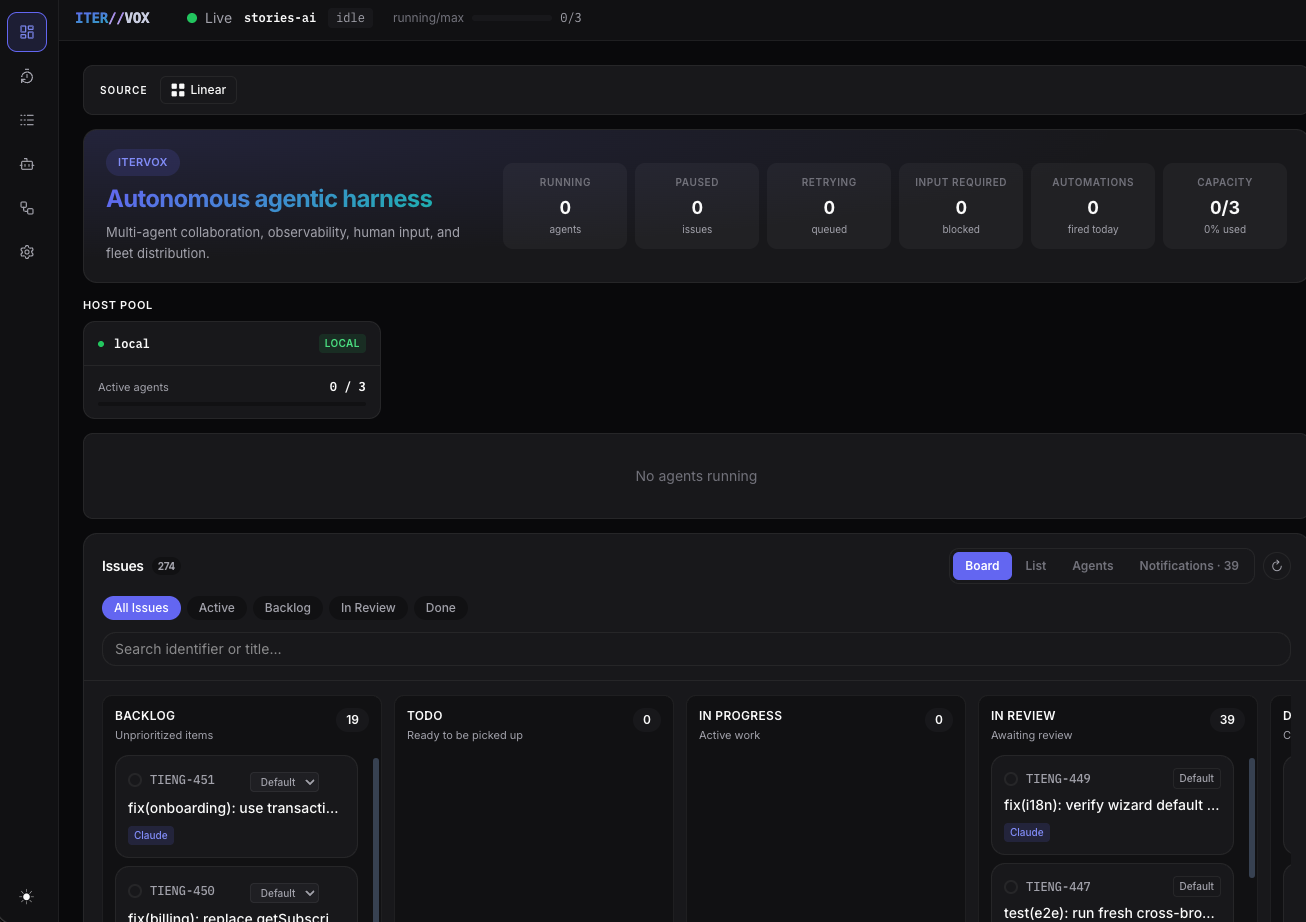
The new Live Ops strip sits directly under the project selector and shows live/waiting/offline state, agent capacity, automation queue length, blocked dependency counts, retries, paused/input-required work, SSH worker activity, and today’s automation dispatch count. If the automation queue reaches its configured cap, the strip turns into a red queue-full warning and makes it clear that new automation triggers are paused.
The dashboard also includes an Automation Queue panel. It shows queued, blocked, dispatching, and dependency-ready automation entries with profile/backend context, blocker badges, queued age, and local search. Open an entry’s details panel to inspect trigger metadata, dependency audit state, automation filters and policy, profile permissions, worker capacity, and the fired-to-running activity path. Retry, resume, and review queues now use the same local search pattern; the review queue starts collapsed so the main dashboard stays scannable.
These surfaces were checked at desktop, tablet, and mobile widths. On mobile, the queue-full alert wraps instead of truncating, queue details stay in a full-width slide panel, and the dependency graph remains bounded without widening the page.
The dashboard also adds a Deps tab near Agents. It renders a display-only React Flow graph of blocker -> blocked issue relationships from dependency audit data, with badges for running, queued, terminal, blocked, unblocked, and unknown state. Clicking a node opens the existing issue detail panel; it does not edit dependencies or tracker state.
Issue detail panels now include a Status changes timeline near the top of the panel. It shows state direction, source chips, timestamps, and automation/profile/backend/worker metadata when a worker or automation moved the issue.
The hero stats bar still includes Automations (how many fired today) and Capacity (used/total agent slots). Below the host pool, the Running Sessions panel shows every active agent with expandable inline logs:
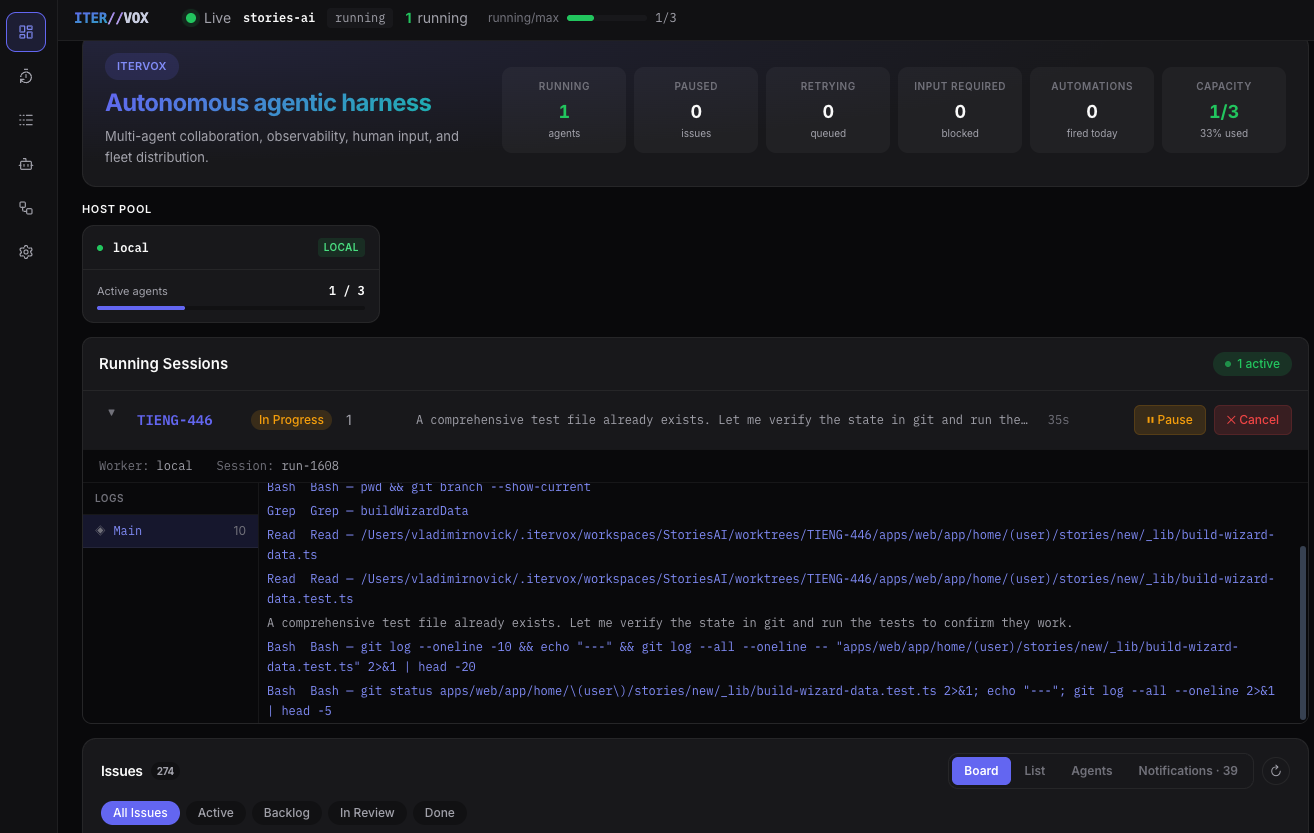
Each running session row shows the issue identifier, state badge, turn count, last output preview, and elapsed time. Expand a row to see the full live log stream with color-coded tool calls (Bash, Grep, Read). Pause or cancel any session directly from the dashboard.
Notifications tab
Section titled “Notifications tab”The issue board now has a Notifications tab that surfaces issues ready for human attention — PRs awaiting review, input-required items, and completed work needing sign-off:
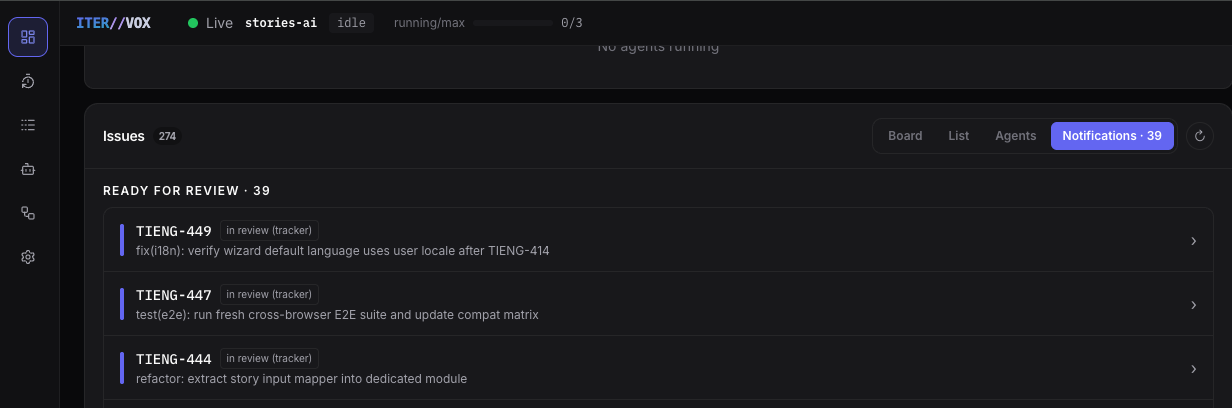
The notification count badge (e.g. “Notifications · 39”) is visible from any view tab, so you always know how many items need attention.
Automations
Section titled “Automations”Automations let Itervox dispatch an agent profile automatically when a trigger fires — on a cron schedule, when an issue enters a state, when a run fails, or when an agent blocks on input.
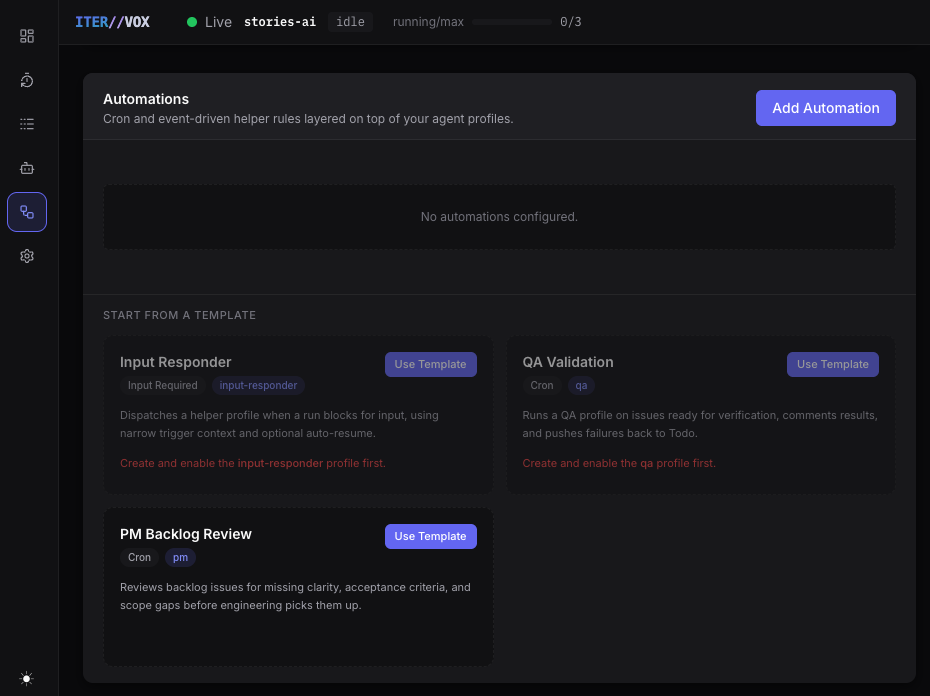
The Automations page’s Configure tab lets you manage automation rules without editing YAML. When no automations are configured yet, Itervox offers three everyday starter templates you can adopt with one click:
- Input Responder — fires on
input_required, dispatches a helper agent that can draft or auto-resume blocked runs. - QA Validation — fires on a cron schedule, runs a QA profile against issues ready for verification.
- PM Backlog Review — fires on cron weekday mornings, reviews backlog issues for missing clarity and acceptance criteria.
Each template pre-fills the automation ID, trigger type, profile reference, filter, and instructions. You can customize everything before saving.
The launch template library also includes advanced helper designs for dependency readiness, planning gates, Claude/Codex planner pairs, debate moderation, evaluator loops, release checks, and skills hygiene. They are shipped as helper patterns, not as deterministic production workflow chains.
Dependency readiness now has one deterministic v0.2.0 path: blockers_resolved fires from dependency audit when a previously blocked issue becomes unblocked. The release-safe default keeps the source filter to backlog / Backlog and moves to Todo only through an explicitly permissioned move_state profile.
Trigger types and the automation editor
Section titled “Trigger types and the automation editor”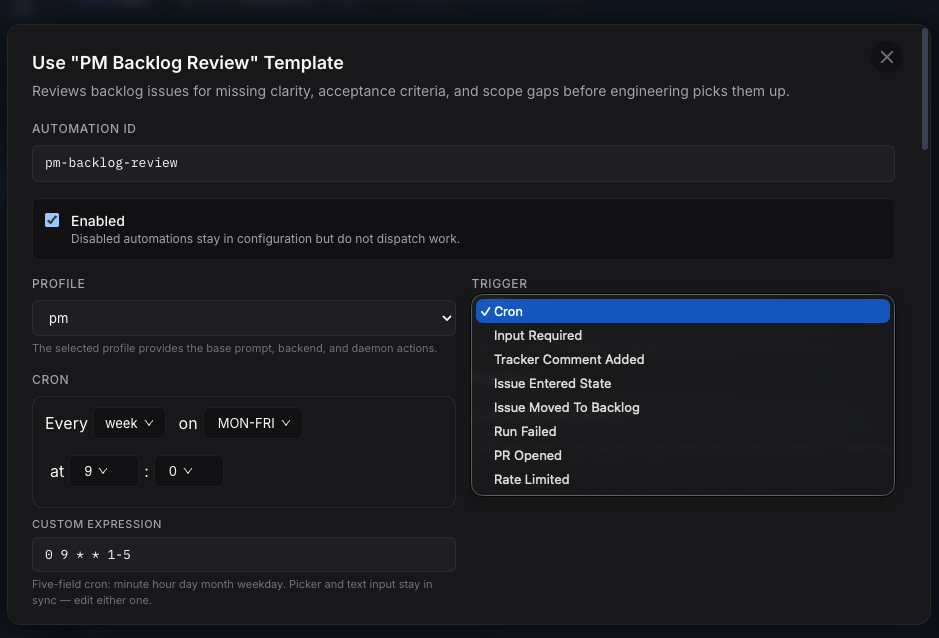
The automation editor modal lets you configure every aspect of an automation rule:
- Automation ID — a stable identifier used in logs and YAML.
- Enabled toggle — disabled automations stay in config but don’t fire.
- Profile — which agent profile runs when the trigger fires.
- Trigger type — choose from ten types:
- Cron — five-field cron schedule with a visual picker and IANA timezone typeahead.
- Input Required — fires when a running agent blocks and asks for human input.
- Tracker Comment Added — fires when a new comment is detected on an issue. Optional
body_containsandbody_regexfilters short-circuit comments that do not match a configured trigger phrase before any agent runs (e.g. a merge-bot only wakes on “AI review passed — ready for merge”). - Issue Entered State — fires when an issue transitions into a specific tracker state.
- Issue Moved To Backlog — fires when an issue enters a backlog state.
- Run Failed — fires when a worker run fails permanently after retries are exhausted.
- PR Opened — fires when a pull request is detected on the issue.
- PR Merged — fires when an itervox-managed PR transitions to MERGED via the daemon-side
merge_praction (a poller for externally-merged PRs is planned). Trigger context carriespr_url,pr_number,merged_sha,base_ref,merged_at. - Rate Limited — fires when a worker run exhausts retries and Itervox classifies the terminal failure as rate-limit-driven.
- Blockers Resolved — fires when dependency audit observes a previously blocked issue becoming unblocked.
For cron triggers, the visual picker and the raw expression field stay in sync — edit either one and the other updates. The expression field accepts standard five-field cron syntax (minute hour day month weekday).
All automations are persisted to the automations: block in WORKFLOW.md and take effect on the next tick without a daemon restart.
[SILENT] no-op convention
Section titled “[SILENT] no-op convention”Recurring automations whose common case is “nothing to report” can suppress the
tracker comment: when the agent’s final output begins with [SILENT]
(case-sensitive), no tracker or PR comment is posted, while the run stays fully
visible in the dashboard logs. Instruct scan-style cron automations to reply
[SILENT] <short reason> on the no-findings path. See the
Automations guide
for the full rules and a cron example.
Automation release boundary
Section titled “Automation release boundary”v0.2.0 automations are single-profile helper runs. They are not advertised as deterministic downstream workflow orchestration. In particular, v0.2.0 does not ship fatal post-change gates, automation skip-decision logs, schedule run-now/next-fire operations, label-to-profile routing, reserved automation slots, generic/editable blocker predicates, full DAG scheduling, structured gate artifacts, PR-check triggers, cost caps, or native multi-step planner/debate workflow execution. Use the documented examples as starter automation patterns, not as production MindWar/Stories-style autonomy templates.
See the Automations guide for the full configuration reference, filter syntax, and prompt variables. Runtime guides are also available for the Automation Queue, Dependency Management, Dashboard Deps, and Issue Status History.
Agent profiles and daemon actions
Section titled “Agent profiles and daemon actions”Agent profiles now have a richer configuration surface. In schema 2, WORKFLOW.md stores each profile’s command plus soul_file and instructions_file references, while profile text lives under .itervox/agents/<profile>/SOUL.md and INSTRUCTIONS.md. The profile editor lets you set the backend and model, edit SOUL and INSTRUCTIONS separately, and — new in v0.2.0 — configure daemon-backed actions that give the agent controlled access to tracker and daemon operations.
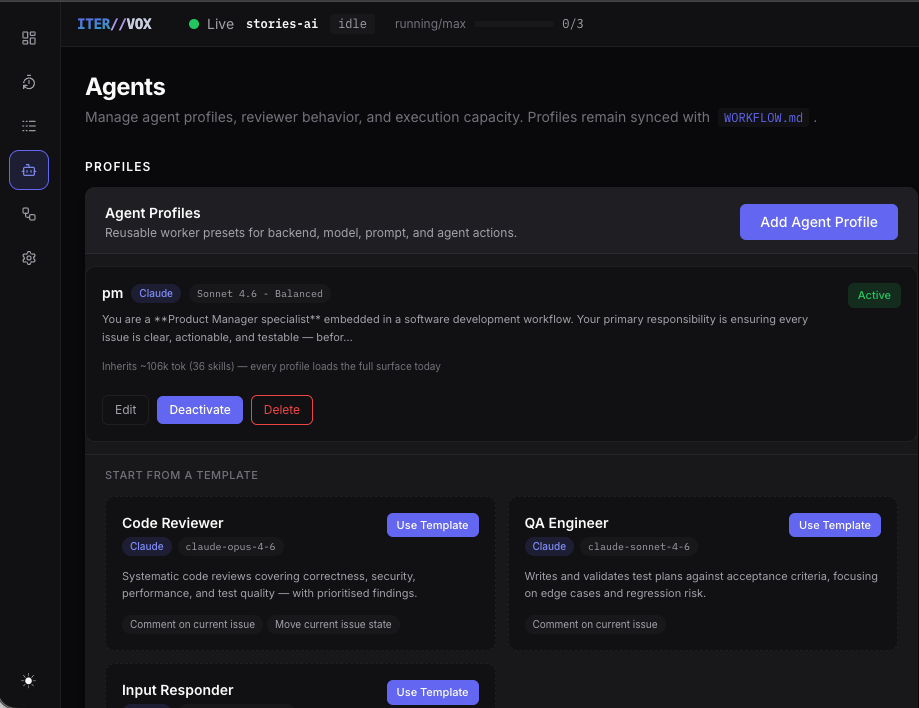
The Agents page shows all configured profiles at a glance:
- Backend and model — visible on each card.
- Context budget — estimated token cost from skills, MCP servers, and instructions. Helps you spot bloated profiles before they slow down first-token latency.
- Active/Inactive toggle — inactive profiles stay in config but are hidden from dispatch selectors and automations.
- Templates — pre-configured profiles you can adopt: Code Reviewer (Opus 4.6), QA Engineer (Sonnet 4.6), and Input Responder.
Profile editor and daemon actions
Section titled “Profile editor and daemon actions”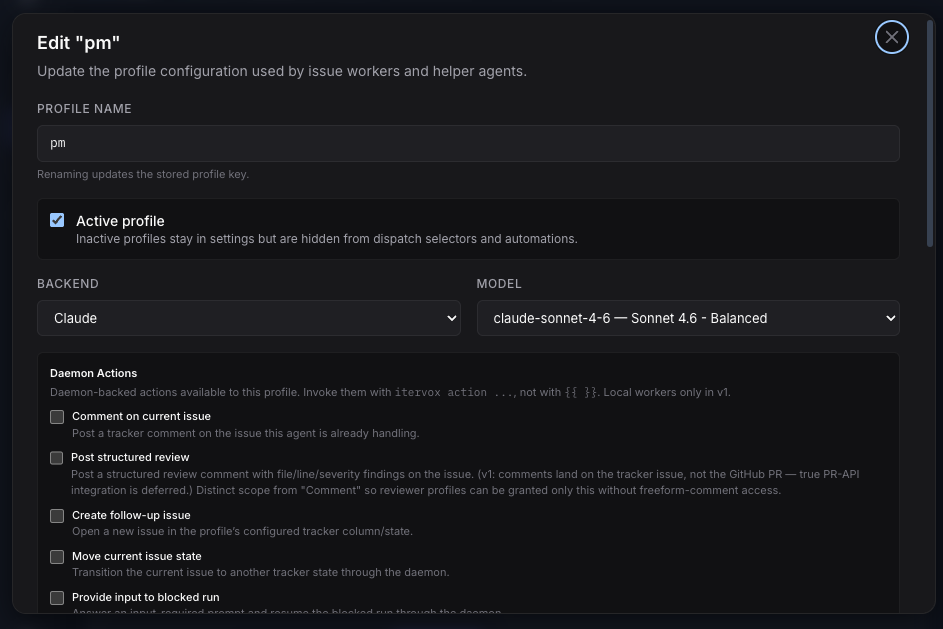
The profile editor now includes a Daemon Actions section. These are not arbitrary permissions — they are tightly scoped, short-lived bearer grants for specific /api/v1/agent-actions/* routes:
| Action | What it does |
|---|---|
| Comment on current issue | Post a tracker comment on the issue the agent is handling. |
Post structured review (comment_pr) | Post a file/line/severity review comment on the tracker issue. |
Merge pull request (merge_pr) | Run the daemon’s guarded gh pr merge sequence with required-check, block-label, and mergeable-state gates. Defaults to --squash --delete-branch; configurable via agent.merge_strategy and agent.merge_block_labels. |
| Create follow-up issue | Open a new issue in the configured tracker state. |
| Move current issue state | Transition the issue to another tracker column. |
| Provide input to blocked run | Answer an input-required prompt and resume the blocked session through the daemon. |
These actions are invoked by the agent via itervox action ... CLI commands, not via the model’s native tool use. The daemon validates every request against the profile’s allowed_actions list and the per-run bearer grant.
itervox init now generates schema 2 workflows and starter .itervox/agents/** files by default. itervox init --update --workflow WORKFLOW.md migrates legacy inline profile prompts by writing a fresh WORKFLOW.md.bak, extracting full prompt text into INSTRUCTIONS.md, generating compact SOUL.md files, and patching broad root .gitignore rules so .itervox/agents/** can be committed. Keep .itervox/.env, .itervox/HEARTBEAT.md, logs, and runtime queue files ignored.
See the Agent Profiles guide for YAML examples and the full field reference.
File-backed agent handoff for chained profiles
Section titled “File-backed agent handoff for chained profiles”v0.2.0 introduces agent handoff: a structured way for multiple profiles working on the same issue to share findings and deliverables. Each worker run writes a Markdown summary to .itervox/handoff/<timestamp>_<profile-name>.md on the issue’s worktree branch; the next worker reads every prior file as a ## Prior Agent Handoffs block prepended to its prompt.
This unlocks the “software factory” pattern teams have been emulating with brittle conventions: a research profile maps the codebase, an implementer reads that research and ships code, a reviewer reads both and validates. Each step’s structured output IS the next step’s input — and the entire pipeline trail commits cleanly into PRs because .itervox/handoff/** is whitelisted by itervox init.
Key behaviors:
- Chronological ordering — the ISO8601 filename prefix sorts lexicographically, so the orchestrator’s prerender block reflects dispatch order without a separate index.
- Budget-truncated — a 30 KB cap on the prior-handoffs section drops oldest first with a
[earlier handoffs truncated]marker so long-running issues with many runs do not blow the context window. - Partial markers — when a worker exits via
TerminalFailedorTerminalStalled, the orchestrator renames the in-flight file to<basename>.partial.mdso subsequent agents distinguish a clean handoff from a crash mid-deliverable. Input-required pauses do not mark partial. run.timestampandrun.handoff_path— the orchestrator surfaces these in a## Run Contextblock in every agent prompt; profile INSTRUCTIONS.md scaffolds now include a “Handoff Protocol” section telling the agent to write its deliverable torun.handoff_pathbefore exiting.
See the Agent Handoff guide for a worked example.
Workspace clear is now terminal-state-only (breaking)
Section titled “Workspace clear is now terminal-state-only (breaking)”workspace.auto_clear: true no longer fires after every successful run. The workspace is preserved across retries, input-required pauses, stalls, and pipeline mid-state transitions, and is only removed when the issue reaches a terminal tracker state — either tracker.completion_state after a successful run, or tracker.failed_state after retries are exhausted. This change is what makes the handoff convention above viable: chained profiles can accumulate .itervox/handoff/ files on the same branch without the clear hook erasing them between runs.
Two operational consequences:
auto_clearandauto_reviewnow safely coexist — the clear is deferred until the reviewer also completes. The legacy validation that rejected the combination is now a no-op (theErrAutoClearAutoReviewConflictsymbol is retained for API compatibility but never fires).- Workspaces of flaky issues that retry many times will accumulate across attempts. If eager disk-space hygiene matters more than handoff continuity, run an external cleanup (e.g.
find <workspace_root> -mtime +1 -delete) outside the daemon.
itervox init --update --workflow WORKFLOW.md prints a one-line notice when it finds workspace.auto_clear: true so the semantic shift is visible during migration.
Skills Inventory and Recommendations
Section titled “Skills Inventory and Recommendations”Itervox v0.2.0 introduces a skills inventory dashboard that scans your project’s skills, plugins, MCP servers, hooks, and instructions — then surfaces actionable recommendations.
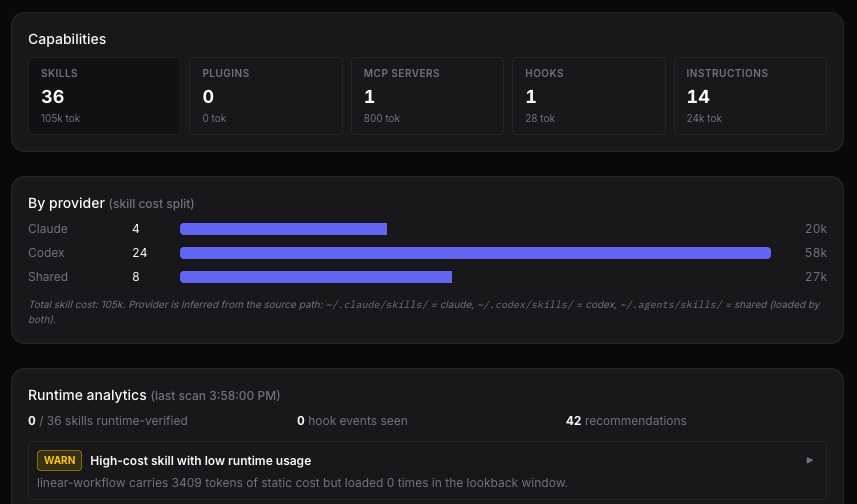
The Skills Inventory section provides:
- Aggregate counts — total skills, plugins, MCP servers, hooks, and instruction files with their estimated token costs.
- Per-provider cost split — a bar chart showing how skill tokens are distributed between Claude, Codex, and shared scopes. Provider is inferred from the source path (
~/.claude/skills/= Claude,~/.codex/skills/= Codex,~/.agents/skills/= shared). - Runtime analytics — how many skills were actually loaded at runtime (vs. just configured), hooks with activity, and the total recommendation count.
- Scan freshness — a current/stale status based on tracked capability-file mtimes, plus the last scan timestamp and Re-scan action.
How runtime analytics work — and why they get sharper over time
Section titled “How runtime analytics work — and why they get sharper over time”Runtime analytics are evidence-based, not prescriptive. The analyzer reads JSONL session logs the daemon already writes for every dispatch under ~/.itervox/logs/<issue>/<session>.jsonl (Claude Code) and ~/.codex/history.jsonl + ~/.codex/sessions/** (Codex). It walks the most recent 25 sessions and aggregates:
- which skills the model actually loaded (vs. which were merely configured)
- how often each hook fired
- which tools appeared in aggregate runtime evidence
Because the data source is real session history, runtime recommendations need representative recent evidence:
- Day 1 (zero session logs) — you’ll see static-analyzer output only: duplicate skills, bloated profiles, and large-context warnings. Runtime recommendations stay empty while
HasRuntimeEvidenceis false. - After a representative sample (~25 sessions across your real profiles) — runtime evidence catches the high-leverage findings: skills that pay their token cost but never get loaded, hooks that fire 50+ times per run, capabilities the model used implicitly but aren’t in the YAML.
- Long-running daemons — the 25-session lookback window slides forward, so stale evidence ages out automatically. A skill you trimmed last week stops showing up as heavy once enough new sessions accumulate.
Practical consequence: don’t expect actionable runtime recommendations on a fresh install. Leave the daemon running, accumulate recent evidence, then come back and act on the warnings. v0.2.0 does not include a long-term learning store beyond the recent log lookback.
For the full reference (rule list, HTTP endpoints, one-click fixes, architecture), see the Skills Inventory guide.
Skills inventory and recommendations
Section titled “Skills inventory and recommendations”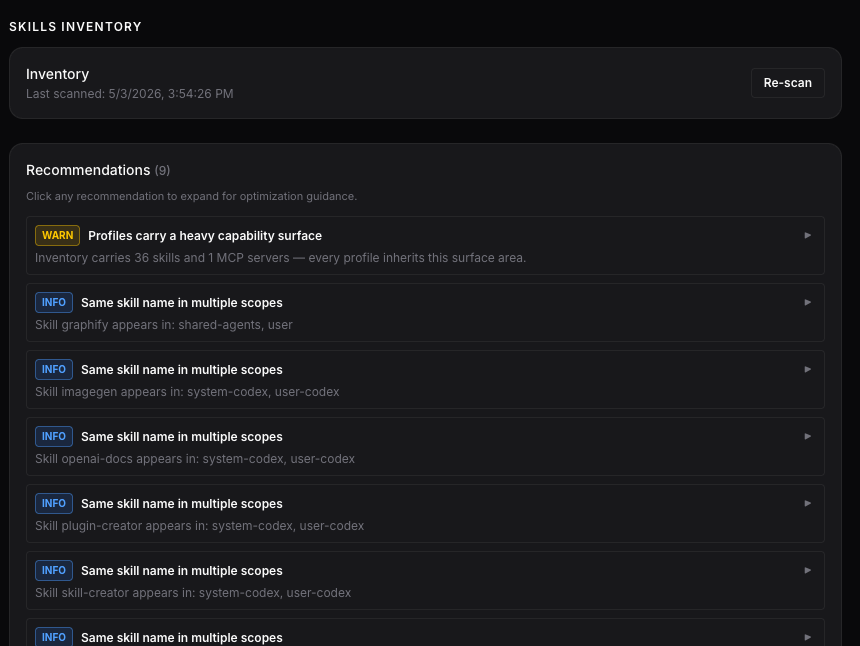
The Skills Inventory scans your file system on demand and produces severity-graded recommendations:
- WARN: Heavy capability surface — your profiles inherit a large number of skills and MCP servers, inflating the system prompt. Consider splitting into focused sub-profiles.
- INFO: Same skill name in multiple scopes — a skill appears in both system-level and user-level directories (e.g.
system-codexanduser-codex). The duplicate adds token cost without adding capability. Remove one.
Each recommendation is expandable for detailed guidance. The Re-scan button triggers a fresh file-system scan.
Retry and rate-limit controls
Section titled “Retry and rate-limit controls”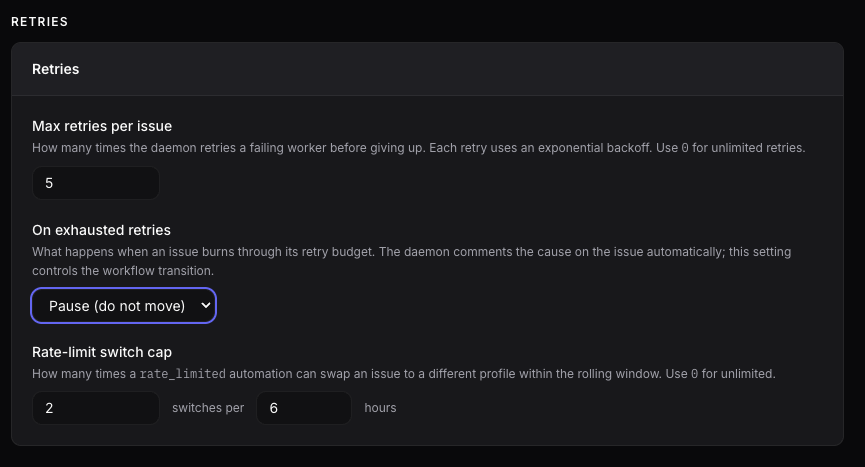
The Settings page now surfaces retry and rate-limit controls that were previously YAML-only:
- Max retries per issue — how many times the daemon retries a failing worker before giving up. Each retry uses exponential backoff. Set to 0 for unlimited retries.
- On exhausted retries — what happens when the retry budget is burned. Options include pausing the issue (do not move) or transitioning it to a configured failure state.
- Rate-limit switch cap — how many times a
rate_limitedautomation can switch an issue to a different profile within a rolling window. Prevents automation ping-pong between profiles. Set to 0 for unlimited. Reaching the cap suppresses switching; it does not cause the trigger.
Operational files
Section titled “Operational files”The daemon writes .itervox/HEARTBEAT.md on startup and refreshes it after state changes at a bounded interval. It records the active workflow path, schema version, dashboard URL, tracker/project, capacity, automation queue pressure, dependency audit summary, input-required count, retry count, and last notable error. It is generated runtime state, not a file to commit.
On startup config-load failure, the daemon writes .itervox/STARTUP_ERROR.md (timestamp, workflow path, YAML/schema diagnostic, suggested fix) before exiting. It is cleared on the next healthy boot. Operators running the daemon under nohup / launchd get a durable record of what broke.
Running two itervox daemons in parallel (multi-repo workflows)
Section titled “Running two itervox daemons in parallel (multi-repo workflows)”A common operator setup is one itervox daemon per repo, with the dashboards running side by side. v0.2.0 changes the defaults so this just works:
server.portdefaults to0(the OS picks a free port). Two daemons in two different repos can both run without configuration. The actual bound URL is written to.itervox/dashboard_urland surfaced inHEARTBEAT.md, the startup banner, anditervox doctor.itervox initscaffoldsserver.port: 0in fresh projects. Existing projects that pin a port (e.g.8090) keep working unchanged.itervox init --update --server-port 0migrates an existingWORKFLOW.mdto the new default. The flag is opt-in: omit it and the field is left as-is.EADDRINUSEis now fatal. If you explicitly setserver.port: 8090and the port is taken by another itervox (or another process), the daemon refuses to start, names the holding PID vialsof, writes.itervox/STARTUP_ERROR.md, and exits non-zero — no more silent shift to port 8091 that mismatches the Vite dev proxy / dashboard URL contract. The error message includes the exactserver.port: 0hint.- Refuse-to-start when a previous daemon is alive. Startup reads
.itervox/daemon.pid; if the PID is still alive the daemon refuses to start so two daemons can’t fight over.itervox/automation_queue.json. Stale pidfiles (PID dead) are silently overwritten. - Clean shutdown removes
.itervox/{daemon.pid, HEARTBEAT.md, dashboard_url}together so a fresh boot never sees stale liveness signals. - Vite dev proxy auto-discovery.
vite.config.tswalks up fromprocess.cwd()looking for.itervox/dashboard_urland uses its content as the proxy target. Override withITERVOX_PROXY_TARGETfor CI. Fallbackhttp://127.0.0.1:8090keeps fresh checkouts working.
itervox doctor got a matching set of mitigation checks:
- Port-in-use: warns when the configured port is held by another
process (named via
lsof). - Stale
HEARTBEAT.md: warns when the file exists but the recorded daemon PID is dead. - Dashboard URL reachability: probes
<dashboard_url>/api/v1/healthwith a short timeout and reports whether the URL serves. - Binary-drift severity: two itervox installs with different version
strings is now
info:(informational); only the “dev binary vs stable release” case is treated as ERROR. Setting$ITERVOX_BINto the running binary downgrades drift toinfo:because hooks (via the workspace allowlist, P0-F) inherit the env var and ignore PATH. itervox doctor --clear-startup-errorremoves.itervox/STARTUP_ERROR.mdfor the “I already fixed the root cause” workflow.
Operator playbook
Section titled “Operator playbook”# In each repo:itervox init --update --server-port 0
# Then start each daemon:itervox
# Each binds its own OS-picked port; dashboards run side by side. Vite's# dev proxy in web/ auto-discovers the URL from .itervox/dashboard_url.itervox doctor is the single command that names every part of the
“Vite spins forever / dashboard doesn’t load / WORKFLOW.md looks fine”
failure triad.
v0.2.0 closing-pass additions
Section titled “v0.2.0 closing-pass additions”The following items landed in the v0.2.0 closing pass and may not be visible in earlier preview builds.
Built-in merge-bot profile
Section titled “Built-in merge-bot profile”Itervox now ships a built-in merge-bot profile embedded in the binary. Reference it from WORKFLOW.md with agent.profiles.merge-bot: {} and the daemon resolves SOUL/INSTRUCTIONS content from the embedded registry (internal/profiles/registry.go). File-on-disk content always wins — itervox init and itervox init --update scaffold built-in files to disk so operators can customise tone while keeping the embedded defaults for unset files. Default command, backend, and allowed_actions (including merge_pr) are pre-wired.
merge_pr action
Section titled “merge_pr action”The new merge_pr agent action runs gh pr view → gh pr checks --required → gh pr merge with required-check, block-label, and mergeable-state guards. Refusal returns a structured reason (blocked_label:<label>, checks_failed:<excerpt>, not_mergeable:<state>). Process-level dedup prevents double-merge across re-fire. Configurable via agent.merge_strategy (default squash) and agent.merge_block_labels (default ["needs-human","migration","auth","feature-flag","breaking"]).
itervox doctor
Section titled “itervox doctor”Preflight subcommand that runs WORKFLOW.md schema validation + dispatch checks without starting the daemon, reports binary-resolution drift between the running daemon’s binary and whatever which itervox resolves on the daemon’s PATH, lists the shipped built-in profile names, and surfaces any existing .itervox/STARTUP_ERROR.md.
ITERVOX_BIN env + .itervox/bin/itervox symlink
Section titled “ITERVOX_BIN env + .itervox/bin/itervox symlink”The daemon now sets ITERVOX_BIN at startup and internal/workspace/hooks.go::hookEnv allowlists it into hook subprocess env so hooks always invoke the running daemon’s binary instead of the stale which itervox resolution. The daemon also refreshes .itervox/bin/itervox symlink on every boot for stable per-repo invocation.
pause_dispatch_when_any_in_state
Section titled “pause_dispatch_when_any_in_state”When ANY tracked issue is in one of the listed states (case-insensitive), no new dispatch begins. Use case: pause Todo dispatch while any issue is “In Review” so PRs queue and merge before the next start. Empty (default) disables the guard.
prefer_high_outdegree dispatch sort
Section titled “prefer_high_outdegree dispatch sort”agent.sort.prefer_high_outdegree: true inserts a tiebreaker that ranks issues blocking more dependent siblings ahead of others, between the priority and createdAt tiers. Foundation issues that unblock the rest of the backlog dispatch first.
Transport-error classifier
Section titled “Transport-error classifier”agent.transport_error_patterns (default ["stream disconnected","connection reset","i/o timeout"]) classifies exhausted-retry exits as transient transport failures rather than generic failures. An internal counter is tracked in orchestrator state; dashboard surfacing is planned for a follow-up release.
init --template flag
Section titled “init --template flag”itervox init --template <minimal|full|rate-limit-fallback|pr-review|daily-qa> accepts the five named presets and rejects unknown values non-zero with the accepted list. In v0.2.0 every preset emits the same default scaffold; preset-specific scaffolds land in a future release.
Queue persistence v2 envelope
Section titled “Queue persistence v2 envelope”Automation queue writes are now wrapped in a versioned envelope (schema_version, daemon_instance_id, payload, payload_sha256). Mismatched envelopes move to automation_queue.json.quarantine instead of being silently consumed. Legacy v1 raw payloads are still read via fallback.
Profile evals suite (P1.a foundation)
Section titled “Profile evals suite (P1.a foundation)”A new internal/evals package + make evals-fast target gates merge-bot prompt regressions on every make verify. Six merge-bot scenarios live under internal/evals/fixtures/merge-bot/ — the green-CI happy path plus the five refusal/selection edges (red CI with approval, block label, wrong marker phrase, multiple matching PRs, no matching PR) — and a two-scenario reviewer suite locks the producer side of the merge handshake (the /ai-approved marker on approve, numbered failures + move_state on reject). Each scenario is an input.yaml / expected.yaml / recording.jsonl triple. The recordings are hand-authored behavioral contracts for now; live mode (real Claude/Codex API calls to record and refresh transcripts, plus phrase-absence assertions) is follow-up work, and the report flags any recording older than its sources as stale.
Automation telemetry counters
Section titled “Automation telemetry counters”New State counters increment for automation_dispatches_pr_opened_total, automation_dropped_pr_opened_dedup_total, automation_dispatches_pr_merged_total, automation_dropped_pr_merged_dedup_total, and automation_drops_self_reentry_total. They are tracked in orchestrator state for audit; dashboard surfacing is planned for a follow-up release.
itervox action CLI subcommands
Section titled “itervox action CLI subcommands”The itervox action CLI gains comment-pr (structured-findings review comment) and merge-pr (guarded gh pr merge wrapper) alongside the existing comment, create-issue, move-state, provide-input subcommands. Agents invoke them via $ITERVOX_BIN action ...; the corresponding routes are documented in API Reference under “Agent actions”. A drift-guard test enumerates the supported actions so a future constant added without a matching CLI line fails the build.
Logs page automation filter chip + duplicate-key dedup
Section titled “Logs page automation filter chip + duplicate-key dedup”FILTER_CHIPSin the Logs page now includes'automation'alongside the existingtext,action,subagent,warn,errorchips. The dedicated automation-only toggle was renamedchip-automation-onlyto avoid testid collision; functionality unchanged.- Timeline and Automation Activity rows always carry a
live/done/runningdiscriminator in their React keys so a live session briefly coexisting with the samesessionIdin history no longer produces a duplicate-key warning.
Dashboard polish
Section titled “Dashboard polish”- The automation queue search input now renders whenever queued OR running automations exist (previously hidden in the running-only case).
AutomationQueueBackpressureexposes structuredLastRejectedAutomationID,LastRejectedTrigger,LastRejectedIdentifieralongside the legacy colon-joinedLastRejectedReasonso downstream surfaces don’t have to parse the string.
Status-history janitor reasons
Section titled “Status-history janitor reasons”The runtime-ledger janitor now appends source: janitor rows to per-issue status history with structured Reason tags:
issue_terminal— terminal-state pruning swept the issue’s runtime ledger entries.absent_from_tracker— absent-issue pruning removed runtime ledger entries for an issue no longer present in tracker polls (after a two-tick grace window).
Per-issue timelines now explain the disappearance instead of leaving a gap.
Linear trashed filtering
Section titled “Linear trashed filtering”All Linear candidate queries (QueryCandidateIssues, QueryCandidateIssuesAll, QueryCandidateIssuesNoProject, QueryIssueDetail) request the trashed field; the normalizer drops issues marked trashed so an archive never produces a dispatch.
WORKFLOW.md.bak stale-detection (init —update)
Section titled “WORKFLOW.md.bak stale-detection (init —update)”itervox init --update now refuses to overwrite an existing WORKFLOW.md.bak unless --force is passed. Operators who hit the migrator twice (once dry-run, once for real) no longer silently lose the original v0.1.x backup.
Model catalog refresh — itervox models + Settings → Models button
Section titled “Model catalog refresh — itervox models + Settings → Models button”itervox init populates agent.available_models by calling the Anthropic and OpenAI /v1/models APIs (falling back to hardcoded defaults when keys are missing). Once WORKFLOW.md is written though, the list goes stale every time Anthropic or OpenAI ship a new model. v0.2.0 adds two refresh paths:
- CLI:
itervox models refresh [--backend claude|codex|all] [--dry-run] [--workflow PATH]queries the live model APIs, merges intoagent.available_models, writes atomically.itervox models listprints the current block as JSON. - Dashboard: Agents page → Models card has a “Refresh from APIs” button plus per-backend Refresh links. Same logic as the CLI, exposed via
POST /api/v1/settings/models/refresh. SSE state refresh fires on success so the model picker updates without a page reload.
Per-backend semantics: refreshed backends have their list replaced entirely; backends NOT named on the command line keep their previous entries. Use --backend claude or --backend codex to refresh one without touching the other.
Run after every Claude / Codex release the team cares about. Don’t put it in CI — the refresh writes to a tracked file. See Agent Profiles → Keeping the model catalog current for the full playbook.
Next steps
Section titled “Next steps”- Automations guide — triggers, filters, instructions, and YAML examples.
- Automation Queue guide — queue drain, cap, and backpressure behavior.
- Dependency Management guide — blockers, dependency audit, and safe unblock automation.
- Dashboard Deps guide — dependency graph semantics.
- Issue Status History guide — status timeline sources and retention.
- Agent Profiles guide — SOUL/INSTRUCTIONS files, daemon actions, SSH, and reviewer config.
- Claude vs Codex Debate guide — experimental comment-only planning debate pattern.
- Configuration reference — full WORKFLOW.md field reference.
- Changelog — complete v0.2.0 changelog.