
Agent Profiles
Itervox supports named agent profiles with per-profile commands, file-backed SOUL/INSTRUCTIONS guidance, and daemon-backed actions, plus SSH-based remote execution and a reviewer-profile flow. This guide covers all of these.
Dashboard
Section titled “Dashboard”The Agents page provides a visual overview of all configured profiles, their backends, models, estimated context cost, and quick actions:
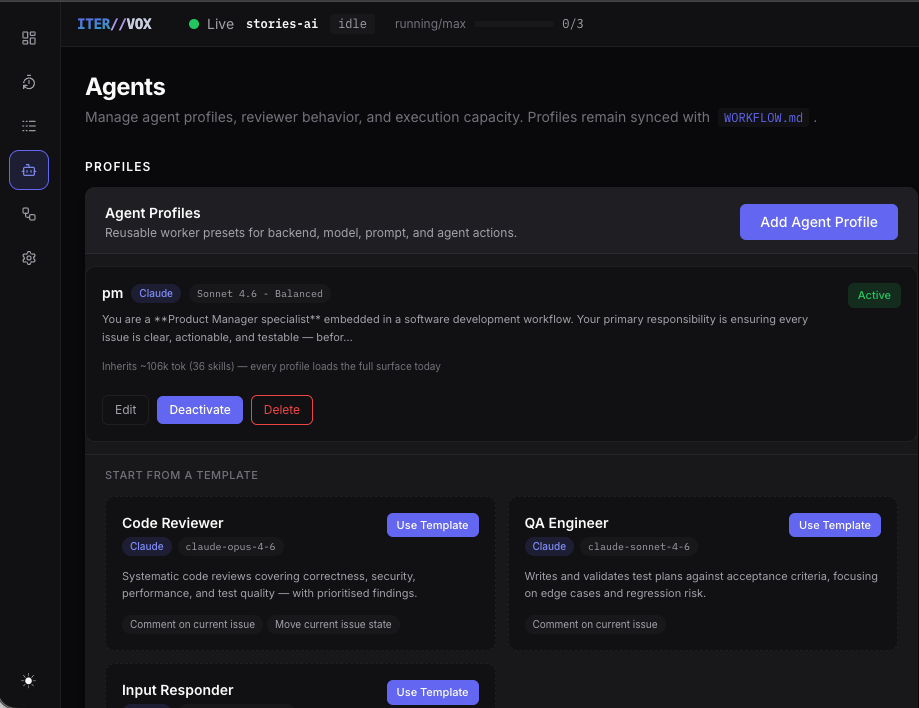
Each profile card shows:
- Backend and model — at a glance.
- Profile-file preview — the first lines of the profile’s SOUL/INSTRUCTIONS guidance.
- Context budget — estimated token cost from all loaded skills, MCP servers, and instructions. Profiles inheriting a heavy surface area are flagged.
- Active/Inactive state — inactive profiles remain in config but are hidden from dispatch and automations.
Below the configured profiles, starter templates (Code Reviewer, QA Engineer, Input Responder) let you bootstrap common profiles with one click. Editing a schema 2 profile in the dashboard writes the profile’s SOUL.md and INSTRUCTIONS.md files separately; the old inline prompt field is compatibility-only.
How profiles work
Section titled “How profiles work”When an issue has a profile assigned (via the Agents page or API), Itervox renders that profile’s SOUL.md and INSTRUCTIONS.md through the Liquid template engine and always appends them to the rendered WORKFLOW.md prompt. No agent_mode flag is needed — profile files inject unconditionally.
Defining profiles
Section titled “Defining profiles”agent: command: claude max_concurrent_agents: 5 max_turns: 20
profiles: backend: command: claude --model claude-opus-4-6 soul_file: .itervox/agents/backend/SOUL.md instructions_file: .itervox/agents/backend/INSTRUCTIONS.md
frontend: command: claude --model claude-sonnet-4-6 soul_file: .itervox/agents/frontend/SOUL.md instructions_file: .itervox/agents/frontend/INSTRUCTIONS.md
qa: command: claude --model claude-sonnet-4-6 enabled: true allowed_actions: [comment, move_state] soul_file: .itervox/agents/qa/SOUL.md instructions_file: .itervox/agents/qa/INSTRUCTIONS.mdExample profile files:
# backend SOUL
## IdentityYou are the backend specialist for this repository.
## PurposeHandle API design, database schemas, server-side business logic, and performance optimisation.# backend INSTRUCTIONS
## Workflow- Work on {{ issue.identifier }}: {{ issue.title }}.- Focus on Go, APIs, database code, and regression tests.Liquid variables in profile files
Section titled “Liquid variables in profile files”Profile files support the same Liquid template variables as the main WORKFLOW.md prompt:
profiles: backend: command: claude soul_file: .itervox/agents/backend/SOUL.md instructions_file: .itervox/agents/backend/INSTRUCTIONS.md| Variable | Type | Description |
|---|---|---|
issue.identifier | string | Issue ID (e.g. "ENG-42", "#123") |
issue.title | string | Issue title |
issue.description | string | Issue body (may be empty) |
issue.url | string | Full URL to the issue |
issue.branch_name | string | Suggested git branch name |
issue.labels | string[] | Labels attached to the issue |
issue.priority | string | Priority label |
issue.comments | object[] | Comments (author_name, body) |
issue.state | string | Current issue state |
issue.blocked_by | object[] | Blocking issues (id, identifier, state) |
attempt | int|null | Current retry attempt (null on first attempt) |
Plain-text profile files (without any {{ }} syntax) are passed through unchanged.
Handoff protocol (v0.2.0)
Section titled “Handoff protocol (v0.2.0)”When multiple profiles run on the same issue, each one can leave a Markdown deliverable in .itervox/handoff/ so subsequent profiles can read it. The orchestrator generates two values per dispatch and surfaces them in the agent’s prompt as a ## Run Context block:
| Value | Description |
|---|---|
run.timestamp | The dispatch instant, formatted ISO8601 with : replaced by - so it is filename-safe (e.g. 2026-05-26T14-30-45Z). |
run.handoff_path | The canonical destination for this run’s deliverable: .itervox/handoff/<run.timestamp>_<profile-name>.md. |
The orchestrator also prepends a ## Prior Agent Handoffs block to the prompt containing every prior agent’s deliverable on this branch in chronological order, budget-truncated to 30 KB (oldest first, with a [earlier handoffs truncated] marker).
Profile INSTRUCTIONS.md files generated by itervox init now include a Handoff Protocol section telling the agent to:
- Read the
## Prior Agent Handoffsblock at the top of its prompt to learn what predecessors did. - Write a concise Markdown deliverable to
run.handoff_pathbefore exiting, summarizing what it did, key decisions, and what the next agent needs to know. - Treat earlier handoffs as read-only — never overwrite a prior agent’s file. The chronological order is the audit trail.
You can adapt this protocol per profile. A reviewer might write findings keyed by severity; an implementer might list files changed and tests added; a researcher might list the patterns it found and risks it flagged. The orchestrator does not interpret the content — it just shuttles it forward.
If a worker exits with TerminalFailed or TerminalStalled, the orchestrator renames the in-flight file to <basename>.partial.md so subsequent agents see it explicitly marked. TerminalInputRequired does not rename — the agent intentionally paused and will resume.
See the Agent Handoff guide for a worked example of chaining three profiles end-to-end.
Mixing runners across profiles
Section titled “Mixing runners across profiles”Each profile can use a different runner binary:
agent:  command: claude
  profiles:    coder:      command: codex      backend: codex            # explicit backend hint (optional)      soul_file: .itervox/agents/coder/SOUL.md      instructions_file: .itervox/agents/coder/INSTRUCTIONS.md
    tester:      command: claude --model claude-haiku-4-5      soul_file: .itervox/agents/tester/SOUL.md      instructions_file: .itervox/agents/tester/INSTRUCTIONS.md
The backend field is an optional hint that overrides automatic runner detection. Use it when the command string is a wrapper script that Itervox cannot introspect.
Keeping the model catalog current
Section titled “Keeping the model catalog current”itervox init populates agent.available_models by calling the Anthropic
/v1/models API (with ANTHROPIC_API_KEY) and the OpenAI /v1/models API
(with OPENAI_API_KEY). When either key is missing, a hardcoded fallback
list is written so the dashboard model picker still has sensible
suggestions out of the box.
When Anthropic or OpenAI ship a new model — e.g. Sonnet 4.7 lands — your
existing WORKFLOW.md keeps the v0.2.0-era list and the picker won’t show
the new option. Two ways to refresh:
From the CLI
Section titled “From the CLI”# Refresh both backends (default)itervox models refresh
# Refresh just one backenditervox models refresh --backend claudeitervox models refresh --backend codex
# Preview without writingitervox models refresh --dry-run
# Print the current list from WORKFLOW.md without hitting the APIsitervox models listThe command queries /v1/models with whichever API keys are loaded from
.itervox/.env, merges the result into agent.available_models, and
writes WORKFLOW.md atomically. Per-backend semantics: refreshed backends
have their list replaced entirely; backends NOT named on the command line
keep their previous entries untouched.
From the dashboard
Section titled “From the dashboard”Settings → Models → Refresh from APIs triggers the same logic via
POST /api/v1/settings/models/refresh. The body accepts
{"backend": "claude" | "codex" | "all"} (default "all"). On success
the server returns the new map and immediately notifies SSE subscribers,
so the model picker reflects the new options without a page reload.
If the daemon is running a build that does not implement the refresh
capability (e.g. the in-memory quickstart binary), the route returns
501 not_implemented with a hint pointing at the itervox models refresh
CLI subcommand.
Recommended cadence
Section titled “Recommended cadence”- After every Claude/Codex release the team cares about. Anthropic
and OpenAI typically publish a release note 24–48 hours before the
model is broadly available via the API; refresh once you can hit
/v1/modelsfrom your account and see the new ID. - As part of project onboarding. The first thing a new contributor
does after cloning is set their API keys in
.itervox/.envand runitervox models refreshso their local picker matches the team baseline. - Never blindly in CI. The refresh writes to
WORKFLOW.md, which is a tracked file. Running it in CI would create a commit diff every time a model launches; prefer running it in a developer shell and committing intentionally.
Daemon-backed profile actions
Section titled “Daemon-backed profile actions”Profiles can opt into a small set of daemon-backed actions. The profile editor exposes these as checkboxes with clear descriptions of what each action allows:
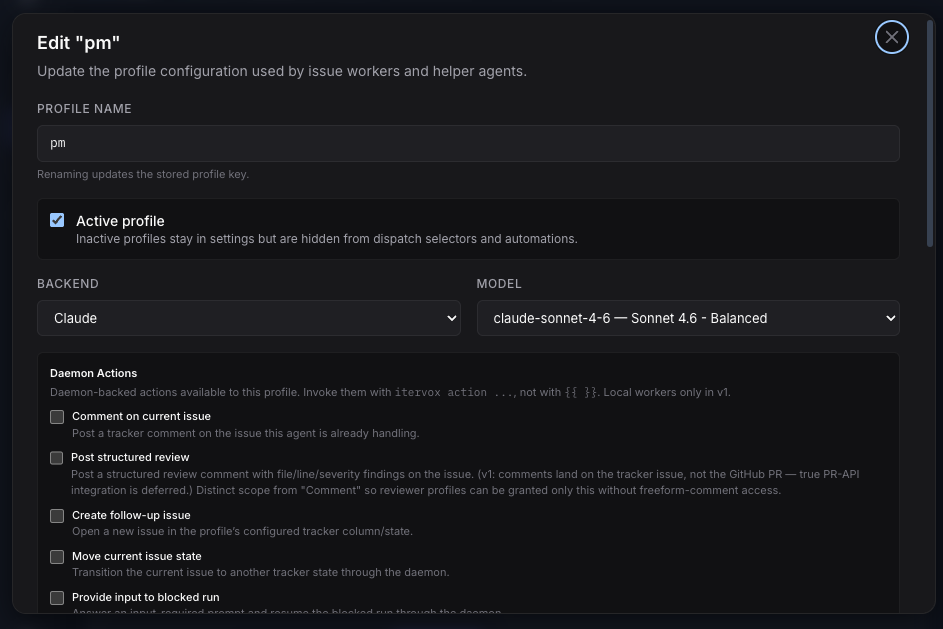
Available actions:
comment— post a tracker comment on the current issue.comment_pr— post a structured review comment with file/line/severity findings on the issue.create_issue— open a follow-up issue in the configured tracker state.merge_pr— run the daemon’s guardedgh pr mergesequence for a PR on the current issue. The daemon validates the request against the profile’sallowed_actionslike every other action, then enforces the merge gate server-side (see below) — the agent never gets rawghcredentials or an ungated merge path.move_state— transition the current issue to another tracker column.provide_input— answer an input-required prompt and resume the blocked session.
What gates a merge_pr merge
Section titled “What gates a merge_pr merge”Granting merge_pr does not mean “the agent can merge anything”. Every merge request runs through a server-side gate that refuses with a structured reason unless all of these hold:
- Not already merged — an already-merged PR returns
already_merged(and a process-level dedup ledger prevents double-merging the same(issue, PR)pair across re-fires). - Mergeable state is clean — GitHub must report the PR as
MERGEABLEwith merge stateCLEAN; conflicts, draft state, or unmet branch protections refuse withnot_mergeable:<state>. - No block label — if the PR carries any label from
agent.merge_block_labels(case-insensitive; default["needs-human", "migration", "auth", "feature-flag", "breaking"]), the merge refuses withblocked_label:<label>. - All required CI checks pass —
gh pr checks --requiredmust exit clean; failing or pending required checks refuse withchecks_failed:<excerpt>. - Valid strategy — one of
squash(default),rebase, ormerge, taken from the request oragent.merge_strategy. The merge runs with--delete-branch.
Example:
agent:  profiles:    input-responder:      command: claude --model claude-sonnet-4-6      soul_file: .itervox/agents/input-responder/SOUL.md      instructions_file: .itervox/agents/input-responder/INSTRUCTIONS.md      allowed_actions: [comment, provide_input]
    qa:      command: claude --model claude-sonnet-4-6      soul_file: .itervox/agents/qa/SOUL.md      instructions_file: .itervox/agents/qa/INSTRUCTIONS.md      allowed_actions: [comment, create_issue, move_state]      create_issue_state: Todo
These permissions do not give the agent arbitrary shell or tracker access.
They only let the daemon mint short-lived per-run bearer grants for the
corresponding /api/v1/agent-actions/* routes. This is what powers things like
automation helpers that comment on the issue, move it back to Todo, create a
follow-up issue, or auto-resume a blocked run with provide_input.
If allowed_actions includes create_issue, create_issue_state is required.
In v0.2.0, daemon-backed action env vars and shims are injected only for local
workers. SSH remote workers with allowed_actions receive a prompt warning that
daemon-backed actions are unavailable remotely; they do not receive
ITERVOX_ACTION_TOKEN, ITERVOX_DAEMON_URL, or the local shim PATH.
Built-in merge-bot profile
Section titled “Built-in merge-bot profile”Itervox ships one built-in profile embedded in the binary: merge-bot. Its purpose is the final step of an automated pipeline — verifying a reviewed PR is safe to land and invoking the guarded merge_pr action — without you having to author the SOUL/INSTRUCTIONS files yourself.
Reference it from WORKFLOW.md like any other profile:
agent: profiles: merge-bot: {}When the profile’s soul_file / instructions_file are unset, the daemon resolves the embedded SOUL.md / INSTRUCTIONS.md content from the built-in registry. Built-in defaults (applied only when the corresponding field is unset):
- Command:
claude --model claude-haiku-4-5-20251001(a fast, cheap model — the merge gate does the safety work, not the model) - Backend:
claude allowed_actions:[comment, comment_pr, merge_pr, move_state]
File-on-disk content always wins: itervox init scaffolds the built-in files to .itervox/agents/merge-bot/ so you can customise tone or rules, and the embedded copies remain the fallback for files you delete or never create. The merge itself is still gated server-side by the merge_pr checks above — the built-in profile carries no special bypass.
There are two supported wirings:
- Human-gated (recommended default) — pair
merge-botwith atracker_comment_addedautomation usingbody_contains/body_regexfilters so it only wakes when a person posts an approval phrase. Note that Itervox ignores its own comments when polling this trigger (anti-loop), so an AI reviewer’s comment cannot fire it — the human comment is the deliberate gate. - Fully autonomous (advanced) — a cron sweep over completion-state issues that checks the PR for an explicit reviewer-posted approval marker before invoking
merge_pr. See the autonomous merge sweep example and its caution list before enabling this.
See the Automations guide for the trigger and filter reference.
SSH remote execution
Section titled “SSH remote execution”Itervox can dispatch agent turns to remote hosts over SSH. This is useful for running agents on powerful cloud machines while keeping the orchestrator local.
Configure SSH hosts
Section titled “Configure SSH hosts”agent: ssh_hosts: - builder-1.example.com - builder-2.example.com:2222 # custom port
dispatch_strategy: round-robin # or "least-loaded"Dispatch strategies
Section titled “Dispatch strategies”| Strategy | Value | Description |
|---|---|---|
| Round-robin | "round-robin" (default) | Issues are assigned to hosts in rotation. Simple and predictable. |
| Least-loaded | "least-loaded" | Issues are assigned to the host with the fewest active agents. Balances load dynamically. |
SSH requirements
Section titled “SSH requirements”- The Itervox process must be able to reach each host over SSH without a password prompt. Use SSH agent forwarding or pre-shared keys.
- The target host must have the agent runner binary (
claude,codex, etc.) installed and on$PATH. - The repository must be accessible on the remote host (either pre-cloned or mounted via NFS/SSHFS).
- If
workspace.worktreeis enabled, the bare git clone must already exist atworkspace.rooton each remote host. - Daemon-backed profile actions are local-worker only in v0.2.0; remote workers can run the model but cannot use the
itervox action ...bridge.
Example with worktree mode
Section titled “Example with worktree mode”workspace: root: /mnt/shared/itervox/workspaces worktree: true base_branch: main
agent: ssh_hosts: - gpu-node-1.internal - gpu-node-2.internal dispatch_strategy: least-loaded max_concurrent_agents: 8Reviewer profile (preferred)
Section titled “Reviewer profile (preferred)”Itervox can dispatch a reviewer agent to check PRs before marking issues
complete. The preferred configuration is reviewer_profile, which reuses a
normal profile definition for review work. The reviewer runs on the same
workspace as the original worker and can also be auto-dispatched with
auto_review: true.
agent: reviewer_profile: code-reviewer auto_review: true profiles: code-reviewer: command: claude --model claude-opus-4-6 soul_file: .itervox/agents/code-reviewer/SOUL.md instructions_file: .itervox/agents/code-reviewer/INSTRUCTIONS.md allowed_actions: [comment, move_state]Notes:
auto_review: truerequiresreviewer_profileto be set.auto_reviewsafely coexists withworkspace.auto_clearas of v0.2.0 — the clear was redefined to fire only on terminal tracker states, so the reviewer gets the implementer’s workspace and the clear is deferred until after the reviewer also completes. The legacyValidateAutoClearAutoReviewconfig-load conflict is now a no-op kept only for API compatibility.
Legacy reviewer prompt
Section titled “Legacy reviewer prompt”The older reviewer_prompt field is still supported when no
reviewer_profile is configured, but it is deprecated.
agent:  reviewer_prompt: |    You are an AI code reviewer for issue {{ issue.identifier }}.
    Steps:    1. Run: gh pr diff --repo owner/repo to read the PR on branch {{ issue.branch_name }}    2. Check for: correctness, test coverage, security issues, and adherence to our style guide.    3. If problems are found:       - Fix them directly in the workspace       - Commit and push: git add -A && git commit -m "fix: reviewer corrections" && git push       - Post a tracker comment summarising what you fixed       - Move issue {{ issue.identifier }} to state "Rework"    4. If the PR looks good:       - Post an approval comment: "AI review passed — no issues found"       - Move issue {{ issue.identifier }} to state "Merging"
Available template variables in the legacy reviewer prompt
Section titled “Available template variables in the legacy reviewer prompt”| Variable | Description |
|---|---|
issue.identifier | Issue ID (e.g. ENG-42 for Linear, #42 for GitHub) |
issue.title | Issue title |
issue.branch_name | Git branch created for this issue |
issue.description | Issue body / description |
Summary: all agent config fields
Section titled “Summary: all agent config fields”| Field | Default | Description |
|---|---|---|
command | "claude" | Default agent runner command |
backend | "" | Override runner detection ("claude" or "codex") |
max_concurrent_agents | 10 | Maximum simultaneous agents |
max_turns | 20 | Maximum turns per agent session |
turn_timeout_ms | 3600000 | Hard time limit per session (ms) |
stall_timeout_ms | 300000 | Inactivity timeout before retry (ms) |
max_retry_backoff_ms | 300000 | Cap on exponential retry back-off (ms) |
max_retries | 5 | Max retries before moving to failed_state |
ssh_hosts | [] | Remote hosts for SSH dispatch |
dispatch_strategy | "round-robin" | SSH routing: "round-robin" or "least-loaded" |
profiles | {} | Named agent profiles |
reviewer_profile | "" | Profile used for code review dispatch |
auto_review | false | Auto-dispatch reviewer after a successful worker run |
reviewer_prompt | (built-in) | Legacy fallback reviewer template when no reviewer_profile is set |
inline_input | false | Post input-required questions as tracker comments |
max_switches_per_issue_per_window | 2 | Rate-limit switch cap for rate_limited automations |
switch_window_hours | 6 | Rolling window for the switch cap |
switch_revert_hours | 0 | TTL after which auto-applied switches revert to the original profile/backend (0 disables) |
rate_limit_error_patterns | [] | Custom substrings for detecting rate-limit errors in agent stderr |
Profile fields
Section titled “Profile fields”| Field | Default | Description |
|---|---|---|
command | (required) | CLI command for this profile |
soul_file | (required in schema 2) | Path to SOUL.md, relative to WORKFLOW.md when not absolute |
instructions_file | (required in schema 2) | Path to INSTRUCTIONS.md, relative to WORKFLOW.md when not absolute |
backend | "" | Override runner detection for wrapper scripts |
enabled | true | Set to false to hide from dispatch selectors and automations |
allowed_actions | [] | Daemon-backed actions: comment, comment_pr, create_issue, move_state, provide_input |
create_issue_state | "" | Tracker state for new issues (required when create_issue is in allowed_actions) |