
The itervox hub (one URL for every project)
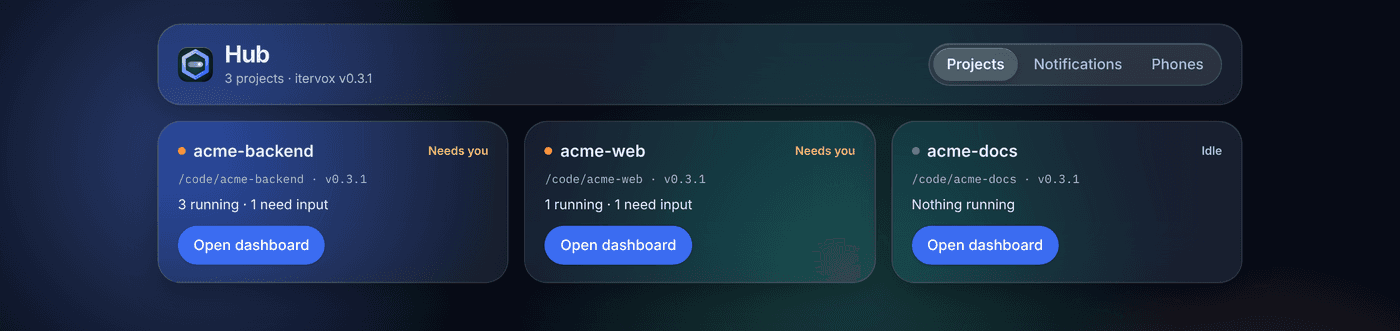
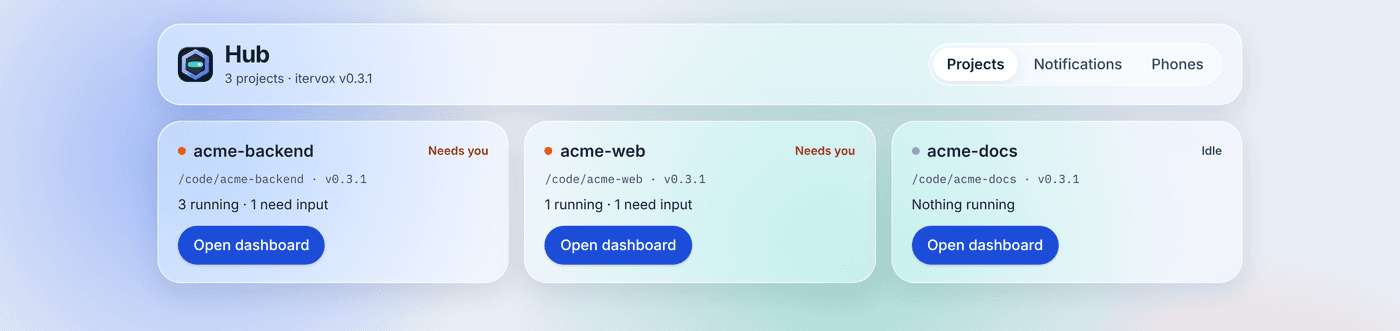
Every project runs its own daemon, with its own port and token. The hub (v0.2.9, #228) gives you one place for all of them: one URL for your browser or phone, one token, one merged event feed. It is free and open source and runs on your own machine; nothing in it phones home.
There is nothing to install. The first daemon started on a machine becomes the hub; every daemon started after it registers with it. When the hub’s daemon stops, the next live daemon takes over within a few seconds.
Quick start
Section titled “Quick start”# Start your projects as usual, in each project directory:itervox
# See the hub and its members:itervox hub# hub: http://127.0.0.1:8089/hub/ (pid 4182, itervox v0.2.9)# members (2):# api http://127.0.0.1:8090/ /Users/you/code/api/WORKFLOW.md# web http://127.0.0.1:8091/ /Users/you/code/web/WORKFLOW.md
# Create a hub token (shown once):itervox token create --hub --name laptop --scope operatorOpen http://127.0.0.1:8089/hub/, paste the hub token, and pick a project.
Each project opens its usual dashboard at /hub/p/<project>/; a selector in
the header switches projects or returns to the list.
Who is the hub
Section titled “Who is the hub”- Each daemon that takes part tries to take an exclusive lock on
~/.itervox/daemons/hub.lock, the directoryitervox status --all --jsonreads. The one that holds it is the hub. - The lock is a kernel
flock: it is released the moment the hub’s process ends,SIGKILLincluded. The other daemons watch the lock file (fsnotify) and retry it every second, so one of them takes over within about a second of a crash and at once after a clean stop. - While it serves, the hub writes its address into
hub.lockas JSON (pid,url,host,port,version,workflow,started_at), which is howitervox huband the Mac app find it. It never holds a token. - The hub listens on
hub.bind:hub.port(127.0.0.1:8089). If the port is busy it takes the next free one and records it inhub.lock.
Members are the live records in the daemon registry from daemons that
take part. The hub refreshes them on every registry change and every 10 s.
For each member it reads GET /api/v1/summary (health, version, counts,
capabilities) and GET /api/v1/route-scopes (the member’s route scope
table).
Project names are the project directory’s name, lowercased (My App →
my-app). Two projects with the same directory name both get a short suffix
from their WORKFLOW.md path (web-3fa1c2), which never changes when other
projects come and go.
Opting out
Section titled “Opting out”itervox --no-hubkeeps a daemon out of the hub: it never becomes the hub and is not listed.hub.enabled: falsedoes the same from settings.- A daemon older than v0.2.9 does not register (its registry record has no
hub_member). itervox demonever takes part.
Hub settings are read at startup. Because the hub is machine-wide, put them
in your user settings file, ~/.itervox/settings.jsonc:
{ "hub": { "port": 8089, "bind": "127.0.0.1" }}The daemon that wins the election uses its own values.
Tokens and scopes
Section titled “Tokens and scopes”The hub has its own token store, ~/.itervox/hub/tokens.json (hashes
only), separate from every project’s. Manage it with itervox token ... --hub:
itervox token create --hub --name phone --scope vieweritervox token list --hubitervox token revoke --hub tok_1a2b3c4d5e6fA hub token’s scope caps what it can do on every member:
| Hub token | Through the hub it may |
|---|---|
viewer | read every project (state, issues, logs, streams), with each project’s viewer redaction |
operator | also dispatch, pause and resume, reply to agents, approve, steer, edit memory |
admin | the same as operator on members (see below) |
To reach a member, the hub uses a token of its own in that member’s token
store: a hub-viewer token for viewer callers and a hub-operator token
for everyone else, created on first use the same way itervox mcp creates
its token. The secret is kept in the member’s
.itervox/hub-<scope>-token.json (mode 0600, gitignored) and is never
printed or logged. itervox token list in the project shows them; revoking
one is safe: the request that hits the revoked token answers 502 and the hub
creates a new one for the next.
The hub never holds an admin token on a member, so project administration (settings, tokens, tmux control, workspace deletion) is not reachable through the hub: open the project’s own dashboard for that.
There is no bootstrap token and no unauthenticated mode: every hub route
except /hub/api/v1/health and the dashboard’s static files needs a hub
token.
The proxy
Section titled “The proxy”/hub/p/<project>/api/v1/... is that project’s API. For every request the
hub:
- authenticates the hub token (401 otherwise);
- looks the method and path up in the member’s own route scope table; a route the member does not declare is 404, and a path with encoded slashes or dot segments is 400;
- refuses what is never proxied: agent-action and guardrail grant routes,
tracker webhooks (403
not_proxied), and member admin routes (403admin_route_not_proxied); - checks the hub token’s scope against the route’s (403
insufficient_scope, naming the scope inX-Itervox-Required-Scope); - removes the caller’s
Authorization,Cookie,OriginandRefererheaders and adds its member token.
Server-sent event streams (/events, log streams) pass through as they
happen. If a member refuses the hub’s token, the hub answers 502 (never 401,
which would sign your dashboard out) and gets a new token.
A member running with server.allow_unauthenticated: true is listed and its
events are merged, but it is not proxied: the hub could not cap a caller’s
scope on it. Open its own dashboard.
Merged feed
Section titled “Merged feed”GET /hub/api/v1/feed?since=<seq> merges every member’s event feed
(Pause dispatch & event feed) into one sequence.
Each event carries project, the member’s workflow and its own
memberSeq; seq is the hub’s sequence number, which keeps growing across
restarts and hand-overs. GET /hub/api/v1/events is an SSE stream that
announces each new head (event: feed) and member-count change
(event: projects).
The hub keeps a cursor per member in ~/.itervox/hub/hub_feed_cursors.json.
After a restart, or when another daemon becomes the hub, it catches up from
those cursors: nothing is missed or repeated. A project the hub has never
seen starts with the events of its current daemon process; older history is
not replayed.
Notifiers
Section titled “Notifiers”Merged events go to every enabled notifier, the seam that desktop, Slack and Web Push notifications plug into. A notifier is a Go interface:
type Notifier interface { Name() string Enabled(project, kind string) bool Notify(ctx context.Context, ev hub.Event) error}Delivery is at least once: a failed Notify is retried with backoff (from 1
s, doubling to a minute) until it succeeds, and each notifier’s cursor is
persisted only after a success, so an event in flight when the hub stops is
delivered by the next one. v0.2.9 ships the log notifier, which logs each
event at debug level (itervox --verbose), and one notifier per
notification channel (below).
Notifications
Section titled “Notifications”The hub turns the merged feed into notifications you control, per project.
Open Hub → Notifications in the dashboard (an admin hub token), or edit
~/.itervox/hub/notifications.json (0600, schema
notifications.schema.json)
and restart the hub.
Kinds. Each kind comes from a feed event:
| Kind | Feed event | Default | Batched |
|---|---|---|---|
input_required | input_required | every channel | never |
guardrail_approval | input_required with payload kind: guardrail_approval | every channel | never |
run_failed | run_failed | every channel | yes |
review_verdict | review_verdict | off | yes |
pr_merged | pr_merged | off | yes |
lesson_proposed | lesson_proposed | off | yes |
dispatch_paused | dispatch_paused | off | yes |
There is no budget kind yet: an issue paused by its budget emits no feed event.
Channels. push (Web Push to your phones, #231: see
Your phone), slack (your own Slack app, #230:
see Slack) and desktop (the Mac app). push and
desktop are built in. A channel that is not set up yet shows as unavailable and receives
nothing; channels.<name>.enabled: false switches one off for every project.
Routing. For each project and kind the matrix picks the channels; a
project without its own route for a kind uses defaults. Every channel
calls the same decision (NotificationSettings.Route in internal/hub), so
Slack, push and desktop always agree.
Snooze. A project can be snoozed until a time (1 hour, 4 hours, a day, a week from the dashboard): its notifications are dropped, not delayed, until then.
Digests. Urgent kinds (input required, guardrail approval) are sent at
once. The others wait: the first one opens a window of
digest_interval_minutes (default 15), and when it closes everything that
arrived goes out as one digest per channel (“3 updates across 2 projects”),
or as itself when it was alone. Digests are hub memory: a hub that stops
drops the pending one.
{ "$schema": "https://itervox.dev/schema/notifications.schema.json", "version": 1, "digest_interval_minutes": 15, "channels": { "push": { "enabled": true }, "slack": { "enabled": true }, "desktop": { "enabled": true } }, "defaults": { "input_required": ["push", "slack", "desktop"], "pr_merged": [] }, "projects": { "web": { "routes": { "pr_merged": ["desktop"], "run_failed": ["slack"] }, "snooze_until": "2026-10-23T08:00:00Z" } }}Test. Each channel has a Send test button
(POST /hub/api/v1/notifications/test, operator).
Desktop. The Mac app holds one GET /hub/api/v1/events stream to the
local hub, with a viewer hub token it creates for itself
(itervox token create --hub --name itervox-desktop --scope viewer, kept in
the Keychain), and shows every event: notification frame as a native
notification; clicking one opens the hub dashboard at that issue. The hub
has already applied the routes, snoozes and digests, so the app routes
nothing itself, and while the stream is up it stops raising its own
per-daemon alerts for local projects. Without a hub it falls back to them.
The app’s Notification Settings… menu item opens this view in the hub
window.
Quiet hours, escalation and role-based routing are not part of the hub.
The Mac app
Section titled “The Mac app”The Mac app uses the hub when one runs on the Mac (v0.2.9, #232):
- it holds one
GET /hub/api/v1/eventsstream for every local project (viewer tokenitervox-desktop) and reads all members with oneGET /hub/api/v1/projectsper refresh, woken by the stream’sprojectsevents, instead of polling each member daemon; daemons that are not members (--no-hub, older releases) are polled as before; - its menu shows the hub’s status and member count, with Open Hub
Dashboard, Phone… (the Phones view with the
pairing QR code) and Notification Settings… — the hub page opened at
/hub/?view=phonesand/hub/?view=notifications, with an admin hub token the app creates on first use (itervox-desktop-admin); - when the hub stops it polls every daemon again until a new hub takes over;
- a remote machine whose daemons form a hub is reached through one SSH or
IAP tunnel to that hub: the app finds it with
itervox hub --jsonon the host, creates an operator hub token there (itervox token create --hub --name itervox-desktop --scope operator) and reads and opens every member through/hub/p/{project}/.
The hub page opens on a given view with ?view=projects, ?view=notifications
or ?view=phones.
Reaching the hub from another device
Section titled “Reaching the hub from another device”For a phone — the installable web app, QR pairing and push notifications — follow Your phone. For anything else:
The hub binds to loopback by default. Every route needs a hub token, so exposing it is safe with tokens only:
- Tailscale: set
"hub": {"bind": "100.x.y.z"}(your machine’s Tailscale address) in~/.itervox/settings.jsonc, restart the daemons, and openhttp://100.x.y.z:8089/hub/with a viewer or operator hub token. - LAN:
"bind": "0.0.0.0"listens on every interface. Use it only on a network you trust, and prefer short-lived tokens (itervox token create --hub --name phone --scope viewer --expires 30d). - SSH tunnel:
ssh -L 8089:127.0.0.1:8089 you@host, then openhttp://127.0.0.1:8089/hub/locally. Nothing changes on the host.
The hub serves plain HTTP; put TLS in front of it (Tailscale, a reverse proxy) when the network is not yours.
Event-loop rule
Section titled “Event-loop rule”The hub runs inside a daemon process but outside its orchestrator event loop. It never touches the hosting project’s state except through that project’s HTTP API, exactly like every other member.
Reference
Section titled “Reference”itervox hub [--json],itervox --no-hub,itervox token --hub: CLIhub.enabled,hub.port,hub.bind,hub.slack.*: Configuration- Slack alerts, replies, approvals and steering: Slack
- The phone web app, pairing and Web Push: Your phone
/hub/api/v1/*,/hub/p/{project}/api/v1/*,GET /api/v1/route-scopes: API reference