
Guardrails
Agents run with their backend’s own permissions in Itervox’s worktrees and in
the tmux sessions you start with New session. Without limits, an agent can
git push --force, push to main, merge its own pull request or run a deploy.
Itervox’s guardrails (on by default, guardrails:)
refuse those operations, or hold them for a human:
| The agent tries to… | What happens |
|---|---|
| push its issue branch (a fast-forward) | allowed |
push to main, master, develop, the base branch or any other branch | refused |
| push a tag | refused |
| force-push or delete its issue branch | refused, unless guardrails.allow_force_push |
git push --no-verify (or an abbreviation git accepts, such as --no-verif), git -c core.hooksPath=…, or a config include (git -c include.path=…) | refused (it would skip the guardrail hook), except a core.hooksPath override on a read-only git command |
git -c core.hooksPath=/dev/null ls-files … and the other read-only git commands | allowed; the override is dropped, so git still sees the guardrail hooks |
gh pr merge, glab mr merge, a merge through gh api / glab api | refused |
git merge while the default branch is checked out | refused |
a command in guardrails.approval_commands (vercel --prod, kubectl apply, …) | waits for a human; runs once on approve |
push a change to CI workflows or CI config (guardrails.lanes.human) | waits for a human; pushes once on approve; never auto-merged |
push a change to a guardrails.lanes.second_opinion file | allowed; merge_pr then needs a reviewer on another backend |
| anything else | runs unchanged |
Every refusal tells the agent what to do instead — push with
git push origin HEAD:refs/heads/<issue branch>, merge the base into the issue
branch rather than rebasing, leave merging to Itervox’s
merge policy or a human.
The issue branch
Section titled “The issue branch”The issue branch is the branch Itervox checked out for the issue (the
worktree’s itervox/<issue> branch, the issue’s tracked branch, or the branch
of its open pull request). An agent that creates a branch of its own for the
issue may push it once it has it checked out: the first push of a new
branch that is not protected is accepted, and that branch then takes the
run’s pushes (Itervox also tracks it as the issue’s branch after the turn). A
second new branch in the same run is refused.
For a tmux session started with New session, the issue branch is the branch
checked out in the session’s folder when it starts; on main (or another
protected branch) there is none, and the agent may only push a new branch it
creates.
Read-only git commands may override the hooks path
Section titled “Read-only git commands may override the hooks path”Some agents disable hooks for their own read-only git calls — Claude Code runs
git -c core.hooksPath=/dev/null … ls-files --error-unmatch -- …. A git
command that runs no hook cannot skip one, so the shim lets a core.hooksPath
override (-c core.hooksPath=… or --config-env core.hooksPath=…) through
when the git command is exactly one of these builtins:
blame, cat-file, check-attr, check-ignore, check-ref-format,
cherry, count-objects, diff-files, diff-index, diff-tree,
for-each-ref, grep, log, ls-files, ls-tree, merge-base,
name-rev, rev-list, rev-parse, shortlog, show, show-branch,
show-ref, var, version
Each reads the repository without writing the index or a ref, so git runs no
hook for it. The read-only forms of two more builtins are allowed the same
way: git remote, git remote -v and git remote get-url …, and a git config
that only reads (--get, --get-all, --get-regexp, --list, the get and
list subcommands, or one key and no value, as in git config user.name); a
config or remote write is refused. An alias cannot stand in for one: git
ignores an alias that has a builtin’s name. The shim drops the override before
it runs git, so git, and any program it starts (a pager, an external diff),
still sees the guardrail hooks.
status, diff and describe are allowed too, although they can run the
post-index-change hook when they refresh the index: because the override is
dropped, that hook runs as configured, so nothing is skipped. Claude Code runs
git status --short this way on every turn.
Everything else with a hooks-path override stays refused as hook_bypass:
- any other git command, including
commit,push,merge,rebase,am,checkout,switch,pullandfetch, and aconfigorremotecommand that writes; - a
-c alias.…,-c include.path=…or-c includeIf.….path=…on the same command line; - a global option the shim does not recognise exactly (git does not accept
abbreviations either), and
--exec-path,--help,--super-prefixor--list-cmds.
Approving a deploy
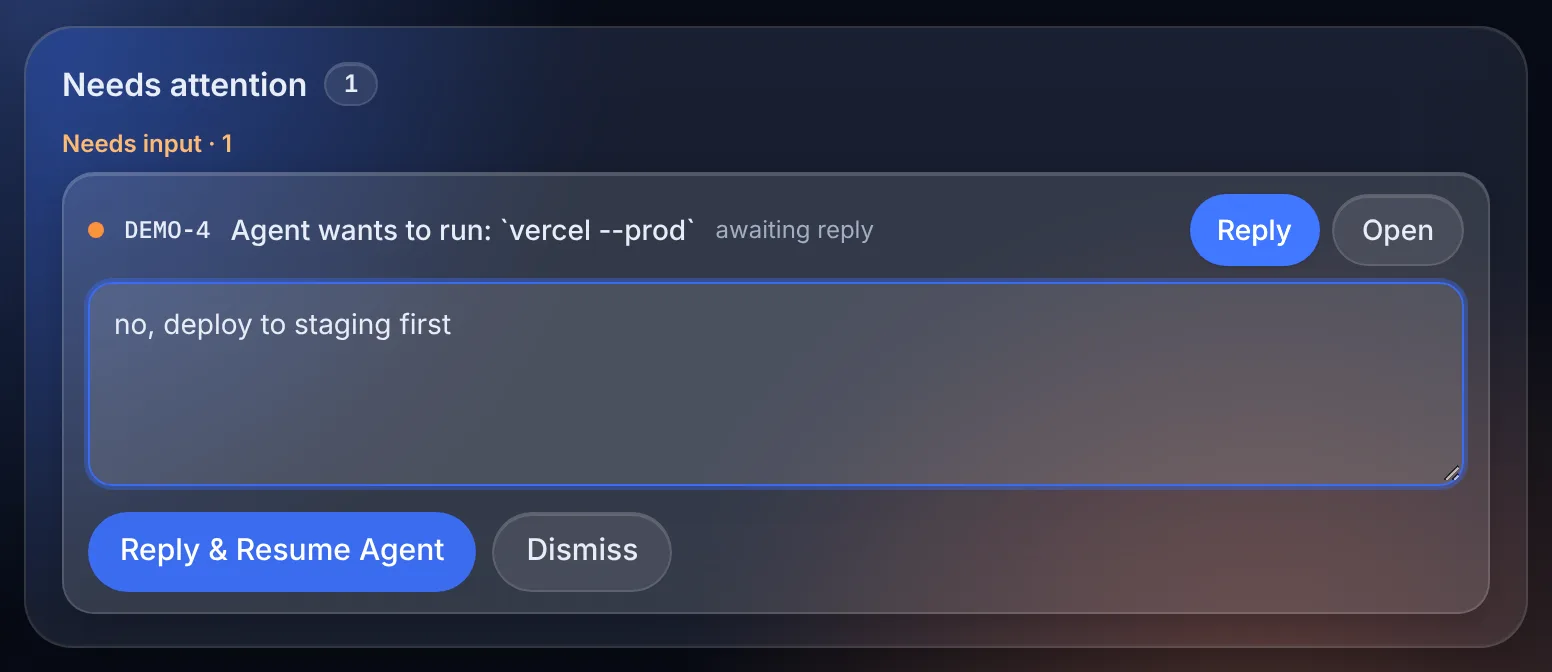
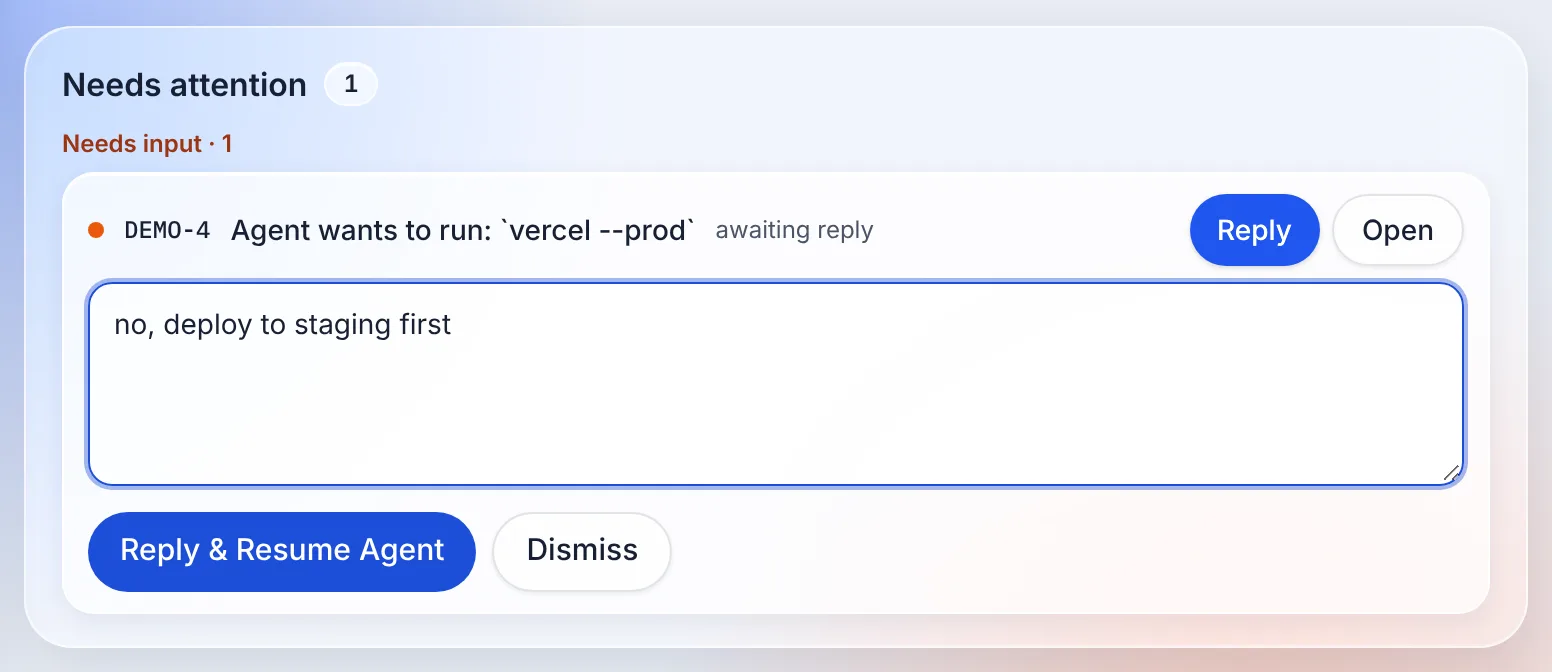
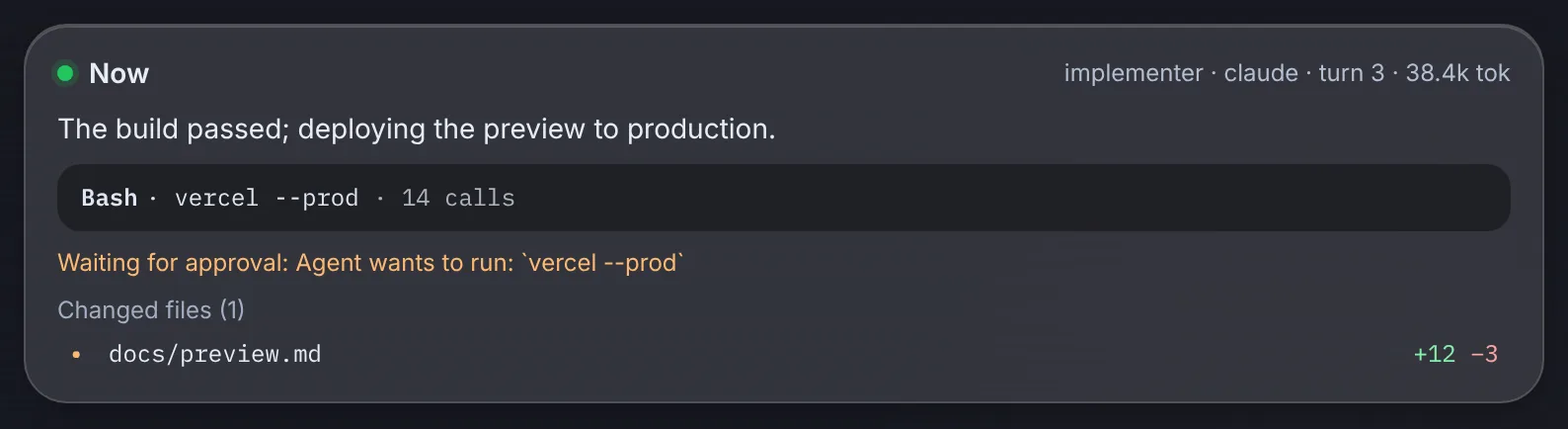
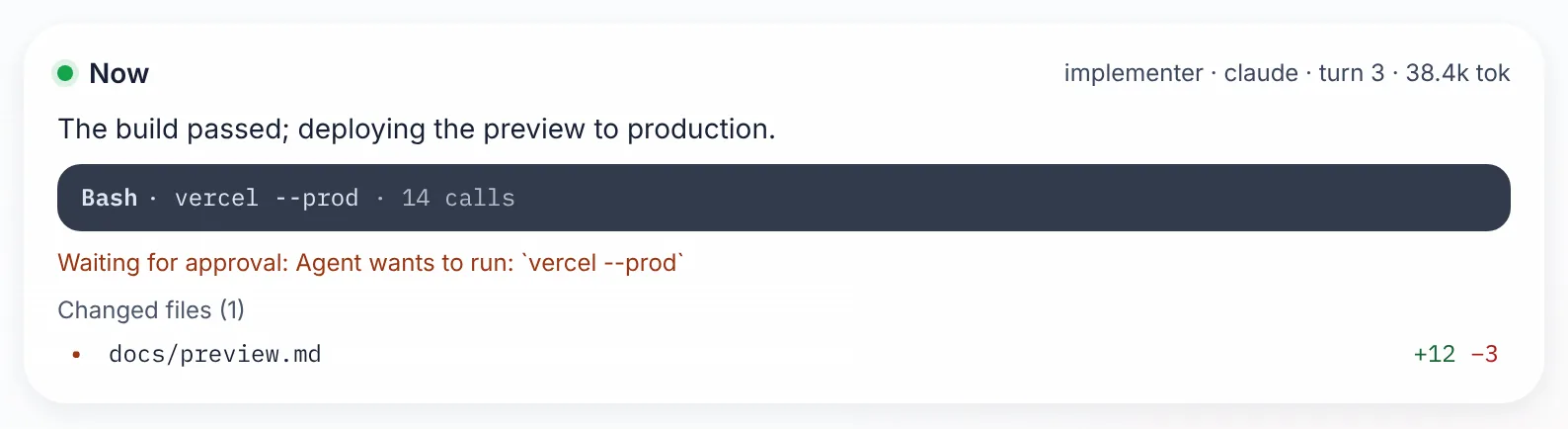
Section titled “Approving a deploy”When an agent runs a command that matches guardrails.approval_commands, the
command blocks and the issue shows an input request — on the dashboard, in the
Sessions panel, in the Mac app and as a tracker comment:
Agent wants to run:
vercel --prod
Reply approve (or yes, ok, allow) to run it once; any other reply
rejects it, and the agent is told your reply as the reason (so
no, deploy to staging first is useful). Dismissing the request rejects it
too. The run keeps going while it waits — nothing is paused or resumed.
Answer an approval
- An agent cannot answer its own request:
itervox action provide-inputis ignored for it, and the guarded agent’s environment has noITERVOX_API_TOKEN. - If the agent’s tool times out while waiting, the request stays open. When the agent runs the exact same command again it joins that request, and an approval given in the meantime runs it then — still once.
- When the run ends, an open request is dropped and the command is refused.
- The agent prints nothing while it waits. That silence does not count
against
agent.read_timeout_msoragent.stall_timeout_ms, so take the time you need; there is no reason to raise them for approvals. Both start again from your answer.agent.turn_timeout_ms(one hour by default) still bounds the wait: when it runs out, the run ends and the request is dropped. This applies to held pipeline pushes too (below). - Tmux sessions have no approval channel: matching commands are refused there, and the agent is told to ask you to run them.
Patterns are glob tokens: the first matches the program name, the rest must
each match an argument, in order, with other arguments allowed between them.
kubectl apply matches kubectl -n prod apply -f k8s/; helm upgrade *-prod
matches helm upgrade api-prod ./chart. Setting approval_commands replaces
the default list.
Environment-scoped rules
Section titled “Environment-scoped rules”A deploy command is often safe against one environment and not another:
terraform apply in the dev workspace is routine, in prod it should wait
for a human. An approval_commands entry may be an object with a when_env
map; the command is held only when every named environment variable’s
value matches its glob in the environment the command runs with:
guardrails: approval_commands: - "vercel --prod" # plain: always held, as before - match: "terraform apply" when_env: {TF_WORKSPACE: "prod*"} # held for prod, prod-eu, … - match: "kubectl apply" when_env: {KUBECONFIG: "*prod*"} - match: "helm upgrade" when_env: {DEPLOY_ENV: "!dev*"} # held unless DEPLOY_ENV is dev…matchhas the plain-entry syntax. The globs use*(anything) and?(one character); a leading!negates. An unset variable is the empty string, soprod*lets a command with the variable unset through, while!dev*holds it — write the negated form when an unset variable should fail closed.- The shim checks the environment the program is really started with, at exec
time:
TF_WORKSPACE=prod terraform apply, anexportearlier in the session and a value computed by the shell all count. - The condition reads environment variables only. A target chosen by a flag
or a file is not an environment variable:
kubectl --context prod applyis matched by the pattern itself (match: "kubectl --context prod* apply"), and kubectl’s current context in~/.kube/configis not seen at all. Pick the variable your tool really reads (TF_WORKSPACE,KUBECONFIG,AWS_PROFILE,CLOUDSDK_CORE_PROJECT, …). - A plain string entry still matches in every environment; if a plain
kubectl applyis in the list, scoping anotherkubectl applyentry changes nothing. Remember that a list replaces the defaults, which holdkubectl applyandterraform applyunconditionally. - An entry that cannot be applied as written (no
match, an unknown key, awhen_envthat is not a map of variable names to strings) is a startup error, never silently dropped.
See Lanes for the full guide, and the pipeline-guard demo to watch a held pipeline push on your machine.
Where a push goes is one question; what it changes is another. An agent
fixing a red build could add continue-on-error: true to
.github/workflows/ci.yml on its own issue branch, and the push would be a
perfectly ordinary fast-forward. Lanes draw the line:
An agent may change what CI checks, never how CI checks.
The pre-push hook lists the files each push changes and puts every one in a lane, the highest that matches:
| Lane | Files | What happens |
|---|---|---|
human | guardrails.lanes.human (default below) | The push waits for a human approval, like an approval command; merge_pr never merges the issue’s pull request |
second_opinion | guardrails.lanes.second_opinion (default: none) | The push goes through; merge_pr refuses until a reviewer on a different backend than the writer’s has approved, after the last such push |
auto | everything else | Unchanged |
The default human lane is deliberately short — files that decide how a change is checked rather than what it does:
.github/** .gitlab-ci.yml .circleci/**.itervox/** !.itervox/handoff/** WORKFLOW.mdCODEOWNERS .github/CODEOWNERSjest.config.* vitest.config.* pytest.ini .coveragerc codecov.yml.golangci.yml Makefile.itervox/handoff/ is excluded because every run commits its handoff there.
pyproject.toml, package.json and go.mod are not in it: their test and
coverage sections cannot be told apart from dependencies by path. Add what
your project uses (setup.cfg, tox.ini, noxfile.py, turbo.json, a
scripts/ci/** directory, …). Setting human replaces the default
list, so copy it to keep it; human: [] turns the lane off.
Patterns are gitignore-style, over paths relative to the repository root:
**matches any number of directories,*and?stay inside one,[…]is a class;- a pattern without a
/matches that name at any depth (Makefilematchesservices/api/Makefile); one with a/(or a leading/) is anchored at the root; - a pattern that matches a directory matches everything under it;
!patternexcludes what an earlier pattern of the same lane matched;- matching is case-sensitive, like git paths.
Which files count. For a branch the remote already has, the files that
differ between the remote tip and the pushed commit — and that also differ
from the base branch, so merging the base in (as the guardrails tell agents
to do) does not count as changing what the base changed. For a new branch,
the files that differ from its merge base with the issue’s base branch: the
pull request’s base (the blocker’s branch for a stacked PR,
workspace.base_branch otherwise), then agent.base_branch, origin/HEAD,
origin/main and main, first found wins. Renames count as a deletion and
an addition, so moving a workflow away is caught too. When the changed files
cannot be listed, the push is held for a human.
A held push shows as an input request labelled Pipeline change, on the dashboard, in the Mac app, on your phone and as a tracker comment, with the files it changes (up to ten, then “and N more”):
Pipeline change: the agent wants to push changes to
.github/workflows/ci.yml(git push origin refs/heads/itervox/eng-1)
It works exactly like an approval command: reply approve to let that push
through once (new commits ask again); any other reply, or dismissing it,
refuses the push, and the agent is told your reply. The agent cannot answer
its own request. Tmux sessions have no approval channel: the push is
refused and the agent is told to ask you.
Approve a held push from your phone (through the hub)
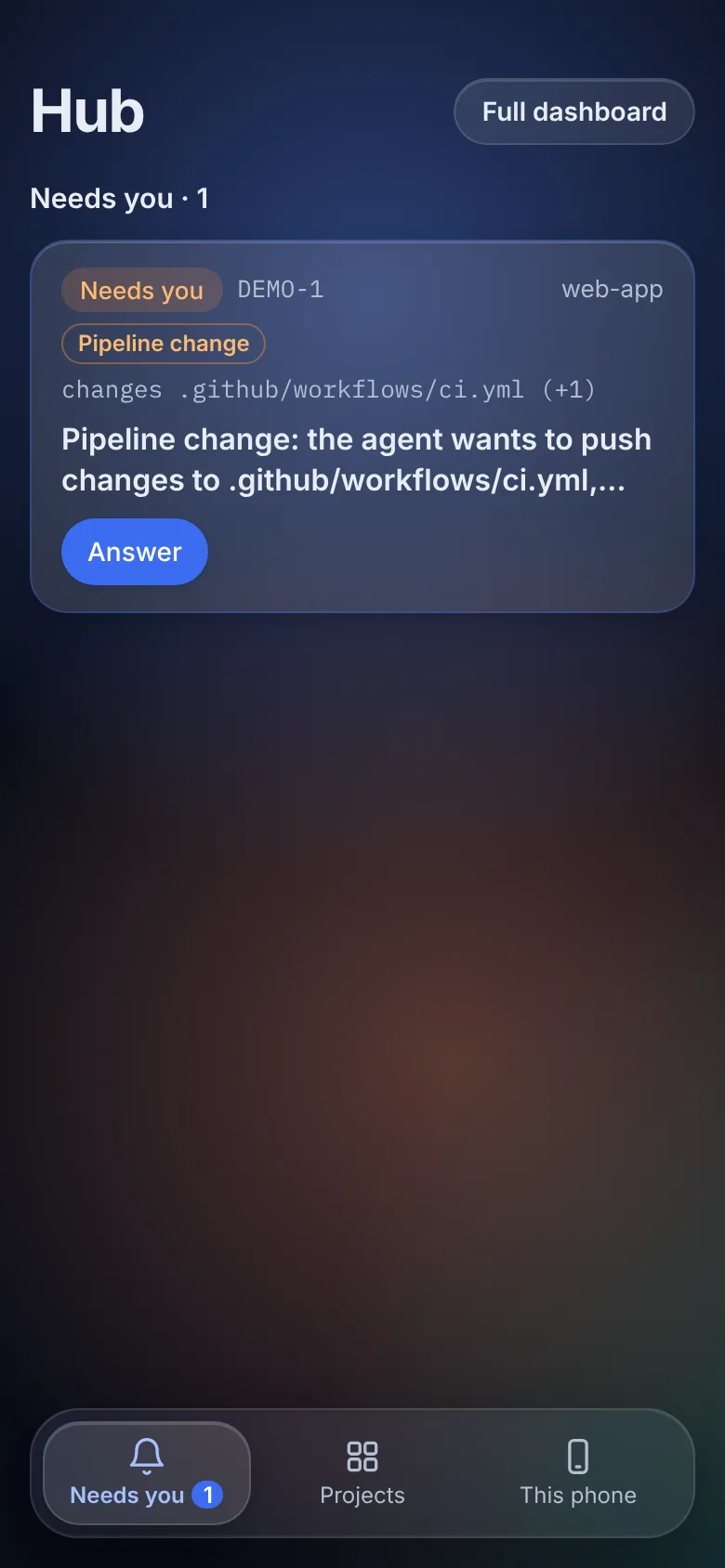
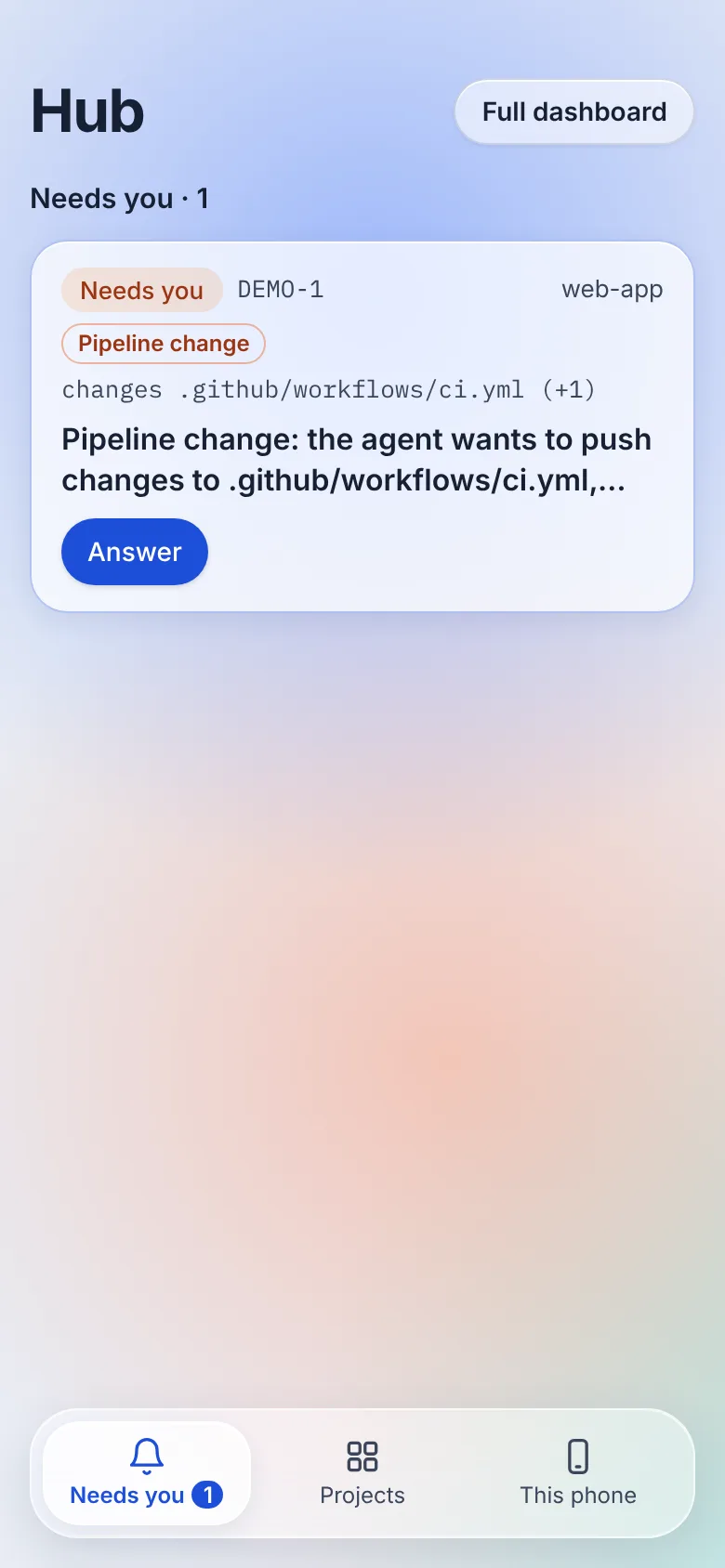
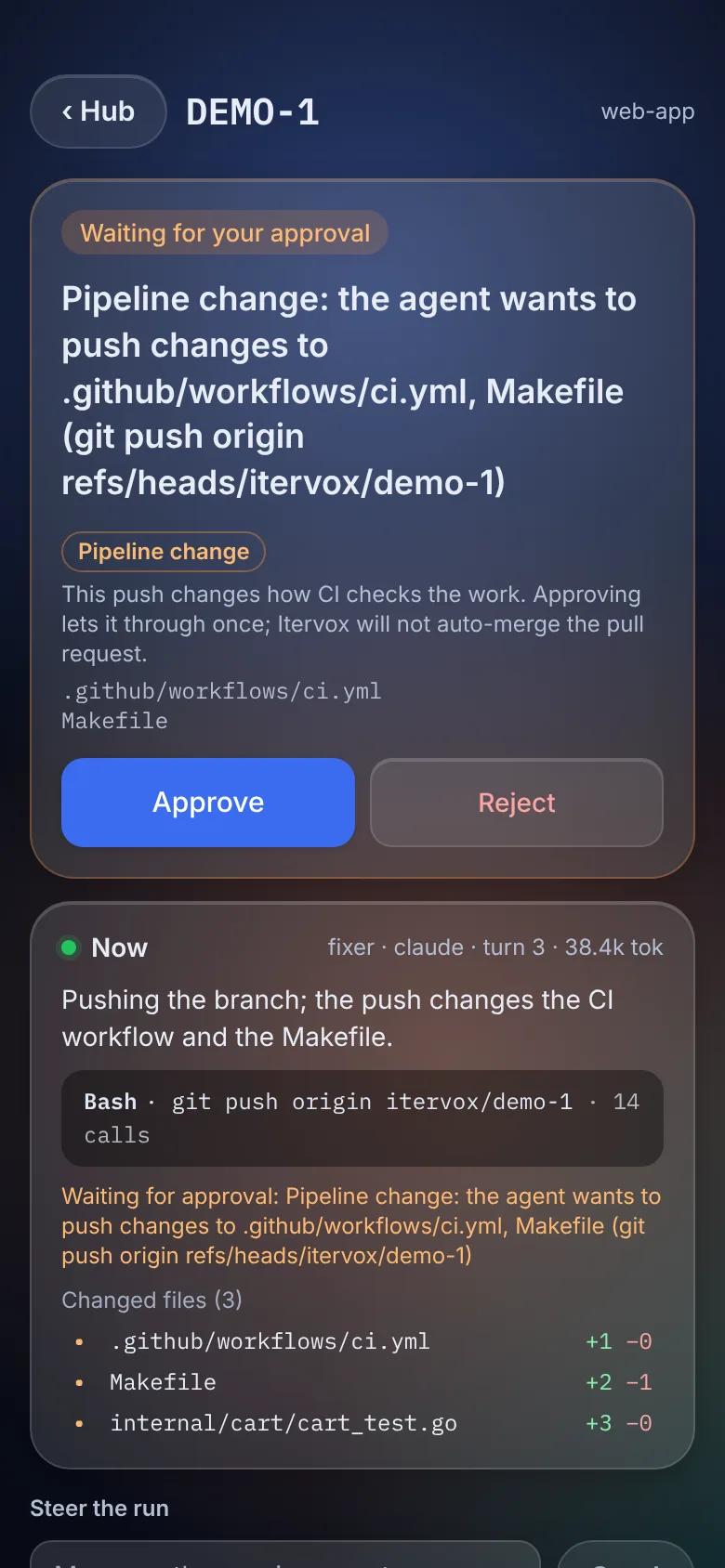
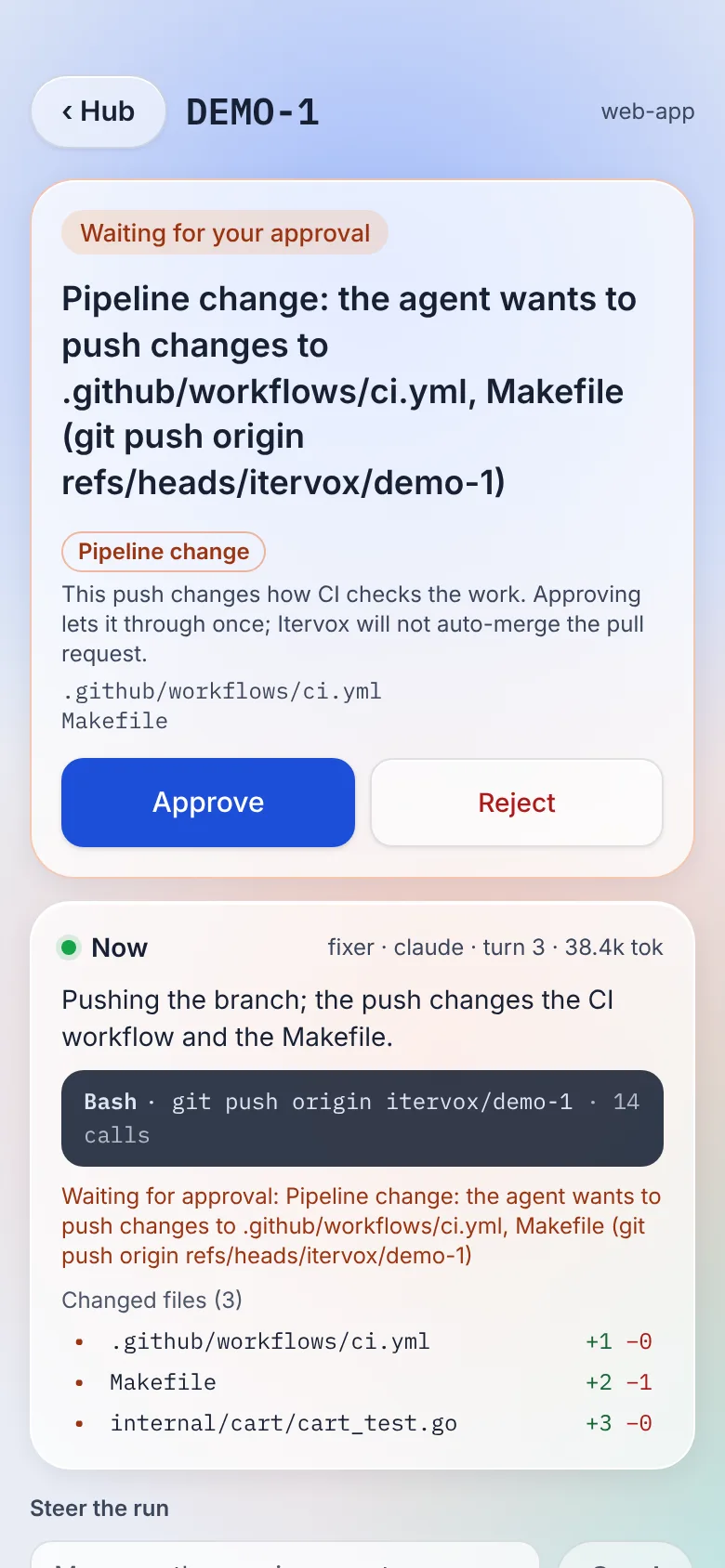
See Your phone to set the phone up.
Merge policy. Pushes that the hook lets through in the human or
second_opinion lane are recorded for the issue (kept across restarts in
.itervox/push_lanes.json, dropped when the issue is done). merge_pr
checks that record before anything else: an issue whose pushes changed
human-lane files is refused with lane_human — even after you approved the
push, merging it stays with a human. A second-opinion issue is refused with
lane_second_opinion until a reviewer whose backend (claude, codex, …)
is not one the writing runs used has recorded an approving verdict after the
last second-opinion push.
guardrails: lanes: human: [".github/**", ".gitlab-ci.yml", ".circleci/**", ".itervox/**", "!.itervox/handoff/**", "WORKFLOW.md", "CODEOWNERS", ".github/CODEOWNERS", "jest.config.*", "vitest.config.*", "pytest.ini", ".coveragerc", "codecov.yml", ".golangci.yml", "Makefile", "tox.ini"] # your own second_opinion: ["internal/auth/**", "migrations/**"]Check the lanes with itervox doctor. Its Lanes section prints the
human and second-opinion globs in effect ((default) when human is not
set, off for an empty list) and warns when the human lane is off. It also
warns when a profile’s verify check is defined by a file
the agent could change on its own. make test runs whatever the Makefile
says, so a Makefile outside the human lane lets the agent change how the
check checks:
Lanes human: .github/**, WORKFLOW.md second_opinion: offWARNING: implementer: verify check test runs `make test`, defined by Makefile, which the agent can change without a human; add it to guardrails.lanes.human implementer: require_evidence lint is agent-reported, not daemon-run (add a verify check of the same name to have the daemon run it)The files doctor looks for: Makefile for make, package.json for npm,
pnpm and yarn, pytest.ini, pyproject.toml, setup.cfg, tox.ini and
conftest.py for pytest, tox.ini for tox, justfile for just, and a
script run by relative path (./scripts/test.sh, bash scripts/ci.sh). A
cd dir && before the command is followed. go test is not on the list:
what it runs is the code under test. The last line lists require_evidence
names that no verify check runs, so the agent’s own evidence file is the
only proof (ci is the pull request’s CI checks and is never listed). None
of this changes doctor’s exit code, and itervox config show ends with the
same section.
Every refused or approved operation is logged (guardrails: refused …,
guardrails: approved …; the command is redacted, never a URL with
credentials), written to the issue’s log, and every refusal is recorded in
Recent failures (kind guardrail) and counted in
itervox_guardrail_blocks_total{kind} — branch, force_push, delete,
tag, hook_bypass, self_merge, approval_rejected,
approval_unavailable, lane_human (a pipeline push refused with no one
to approve it, or left unanswered), lane_rejected (a pipeline push a
human rejected or dismissed) and patch_out (an agent of a push: daemon
profile tried to push or to open or change a pull request; see
Patches only). An approved pipeline push and a refused
merge_pr are logged and written to the issue’s log.
How it works
Section titled “How it works”Each guarded run gets a private directory with:
- shims — small scripts named
git,gh,glaband the programs ofapproval_commands, put first on the agent’sPATH. A shim runs the itervox binary, which inspects the arguments and either refuses, asks for an approval, or replaces itself with the real program (found onPATHpast the shims), passing the same arguments, input, environment and exit status; - git hooks —
core.hooksPathpoints at the directory throughGIT_CONFIG_PARAMETERS. Itspre-pushchecks every ref the push updates; every hook then chains to your repository’s own hooks directory (itscore.hooksPathor.git/hooks), so your hooks still run.
Shims and hooks reach the daemon only through token-gated endpoints
(/api/v1/agent-actions/{issue}/guardrail/…) with a per-run token: one
records a refusal, one raises and reads an approval request, and one
records the lane a let-through push reached (a push whose lane cannot be
recorded is refused). Nothing on
the daemon runs a command for an agent. Itervox’s own git commands are not
affected.
How it’s tested
Section titled “How it’s tested”- End to end. The shim and hook tests run real git against a bare remote, with the test binary standing in for itervox, through the same shims and hooks a run gets, including commands quoted and spaced the ways a shell accepts.
- Fuzzing. Go fuzz targets cover the command classifier
(
FuzzDecide,FuzzMatchApproval), the lane matcher (FuzzLanes) and the signed-check records (FuzzRecordVerify,FuzzRecordByteFlip). They check that the classifier is deterministic, that adding arguments never relaxes a refusal, that spellings git treats as the same (CORE.HOOKSPATH,-cKEY=VALUE,--config-env,--no-verif) andgh/glabflags placed between the words stay refused, and that the glob and lane matchers agree with independent reference implementations. They also check that path spellings (./,//, a trailing/,\) never change a lane, and that no byte string verifies as a record the key did not sign. The seeds run with everygo test;make fuzzruns each target forFUZZTIME(30s by default). - Cost per call.
scripts/guardrails-shim-latency.shtimesgit rev-parse HEADandgit status --shortthrough the shim and directly. On a shared 4-CPU Linux test machine under load, the shim added about 8–9 ms at p50 and 10–15 ms at p95 per git call (git alone: about 2 ms). Most of that is startingshand the itervox binary; the decision itself is microseconds. Expect different numbers on your machine.
Signed checks
Section titled “Signed checks”See Signed checks for the full guide.
The writer is never the judge. An agent saying “done” is a claim, and with
require_evidence the agent that wrote
the fix also writes the proof. With a profile’s
verify list, the daemon runs each check
itself, on the tree the agent left, and signs what it saw: done is a claim,
a signed run on the same tree is proof.
agent: profiles: implementer: require_evidence: [test] verify: - name: test run: make testAfter the agent’s last turn, before the run counts as succeeded (and before
the handoff, the pull request push or the completion move), the worker runs
each command in the worktree. A non-zero exit, a timeout or a check that
changes the tree holds the run input required with the check’s name and
exit code, exactly like missing evidence; every check exiting 0 lets the run
succeed.
What is recorded. One JSON line per check in
.itervox/attestations/<identifier>/<run timestamp>_<profile>.jsonl next to WORKFLOW.md,
followed by a seal line with the tree after the last check:
| Field | Meaning |
|---|---|
command, argv, pipefail | The configured command (redacted) and how it ran: bash -lc with set -o pipefail, so make test | tail records make’s status, not tail’s. |
exit_code, timed_out, error | The process’s real exit status; -1 when it was killed or could not start. |
started_at, duration_ms | When it ran and for how long. |
output_sha256, output_tail | SHA-256 of the complete combined stdout and stderr; its last 4 KiB, redacted like log lines. |
tree_hash, tree_excludes, head | The git tree of the working tree when the check started — tracked files plus untracked files git does not ignore, committed or not, without .itervox/handoff/ and .itervox/evidence/ — and the HEAD commit. |
key_id, sig | The signing key’s id and an ed25519 signature over every other field. |
The tree hash is computed with a private copy of the index
(GIT_INDEX_FILE in a temporary directory, git add -A, git write-tree),
so your index, staged changes and git status are untouched.
Verifying. A record is verified when its signature is valid for the
daemon’s key and its tree is the run’s final tree (the seal’s). The dashboard
API reports this per record
(GET /api/v1/issues/{identifier}/attestations),
and the dashboard shows it in the issue panel’s Signed checks section:
each run’s checks with their exit code, duration, short tree hash and
whether the record and the run’s seal verify;
anyone with the public key can check a file offline, and --tree proves the
records are for the code in front of them:
itervox attest verify .itervox/attestations/ENG-1/2026-11-14T10-00-00.000Z_implementer.jsonl --tree ../worktreeA record copied from an earlier tree fails --tree; an edited exit code or
output hash fails the signature.
The key. The daemon (and itervox run) creates an ed25519 key pair the first time it starts with a profile that has verify:
.itervox/attest.key (mode 0600, gitignored) and .itervox/attest.pub (share
it to let others verify). The private key is on the
process isolation deny list, and under
isolation: process the checks themselves run in the agent’s sandbox, so
neither the agent nor the code it wrote can read the key to forge a record.
What it does not prove. A signature says this daemon ran this command on
this tree and saw this exit code; it does not say the command tests the right
thing. Keep verify commands in WORKFLOW.md, not in files the agent edits:
make test runs the Makefile on the agent’s branch, so keep it in the human
lane (it is by default); itervox doctor warns about a check whose
definition is not.
Without isolation: process an agent runs as your user and could read the
key; the signature then proves only that the record was not edited afterwards.
Interactive sessions (itervox hook)
Section titled “Interactive sessions (itervox hook)”The shims and the pre-push hook guard the agents Itervox starts. For an
agent session you run yourself — Claude Code or Codex in your own terminal —
itervox hook applies the same policy, read from the project’s
WORKFLOW.md, as a PreToolUse hook. No daemon has to run.
itervox hook install claude # .claude/settings.json (this project)itervox hook install claude --user # ~/.claude/settings.json (every project)itervox hook install codex # .codex/hooks.jsonitervox hook install claude --print # show the snippet, write nothingitervox hook install claude --user --absolute # run this binary by its pathThe entry runs itervox from PATH. If that is missing, or is another
itervox (one older than 0.3.3 has no itervox hook), the hook fails, and
Claude Code and Codex treat a failing hook as non-blocking, so the guardrail
silently does not apply. install warns when the itervox on PATH is not
the binary you ran it with, and itervox doctor warns for every installed
hook in that situation. --absolute writes this binary’s path instead (the
PATH path when that is the same binary, so a Homebrew upgrade keeps it
working); prefer it for --user, and keep the bare itervox in a project
file you commit, where each developer’s path differs.
install merges one hooks.PreToolUse entry into the settings file and
keeps everything else (other hooks, permissions, key order); running it again
changes nothing, and an older itervox entry is replaced, not duplicated. The
project entry for Claude Code is:
{ "hooks": { "PreToolUse": [ { "matcher": "Bash|Edit|Write|MultiEdit|NotebookEdit", "hooks": [ { "type": "command", "command": "itervox hook claude-pretooluse --workflow \"$CLAUDE_PROJECT_DIR\"/WORKFLOW.md" } ] } ] }}For each tool call the hook answers:
| The agent’s tool call | Hook answer |
|---|---|
a Bash command the guardrails refuse (gh pr merge, git push --no-verify, git -c core.hooksPath=… other than on a read-only git command, git merge on the default branch, a push to a protected branch, a tag push, a force push or remote branch deletion unless allow_force_push) | deny, with the refusal’s reason |
a Bash command in approval_commands (an environment-scoped entry only when the session’s environment, or the command’s own VAR=value prefix, matches) | ask: you confirm it in the agent’s permission prompt |
an edit (Edit, Write, MultiEdit, NotebookEdit) of a guardrails.lanes.human file | ask: “pipeline file: an agent may change what CI checks, not how” |
| anything else | no answer: the agent’s own permission rules decide |
Every command of a line is checked — after &&, ; or |, inside $(…),
backticks, bash -c '…' and eval, behind sudo, env, timeout and
xargs, and by its program name when called by path. A program the shell
only knows at run time ($TOOL apply) asks, and so does a scoped rule whose
variable is set from a substitution (TF_WORKSPACE=$(cat ws) terraform apply).
Fail-safe. If the hook cannot apply the policy — the named WORKFLOW.md
is missing or does not parse, a guardrails: entry is invalid, the hook input
is not PreToolUse JSON — it answers ask with the reason, never a silent
allow. Without --workflow (the --user install) the hook uses the nearest
WORKFLOW.md at or above the session’s directory; finding none means the
project does not use Itervox, and the hook stays out of the way
(--require-workflow asks instead). guardrails.enabled: false turns it off.
Codex. Codex runs PreToolUse hooks from .codex/hooks.json (the same
hooks.PreToolUse shape) for its shell tool and for apply_patch, whose
patch’s file headers the hook reads as the edited paths. Codex does not
support an ask answer (it treats one as a hook failure and lets the call
run), so codex-pretooluse turns every ask into a deny whose reason says a
human has to run or approve the command. Codex asks you to review a new or
changed hook before it runs it: open /hooks in Codex and trust it.
Known limits
Section titled “Known limits”- Runs on SSH worker hosts are not guarded in this version; a warning is logged at startup and for each such run.
- Sessions you start by hand are never touched by the shims and hooks; the PreToolUse hook is an opt-in convenience layer for them.
- The shim reads the command line, not git’s configuration: a git alias
for
push(git config alias.p push, thengit p --no-verify) is not recognised as a push. - Lanes see only pushes that go through the hook. The same bypasses apply
(git by absolute path,
--no-verifythrough another git, a push through the GitHub or GitLab API, an agent with its own token), and a pull request edited on the web is never classified.merge_prrefuses on the issue’s recorded pushes; it does not re-read the pull request’s file list, so a change that reached the branch another way is not caught there. Protect CI files with branch protection and CODEOWNERS review on the remote; lanes keep honest agents honest, they are not a substitute. - Lanes are path patterns. A test-runner setting inside a file that is not
in the human lane (
package.json’sjestkey,pyproject.toml’s[tool.pytest], aconftest.pythat skips tests, a test marked skip) is not seen. Code review still matters. - An agent CLI running in its own sandbox that blocks network access (for
example Codex with
permission_mode: sandbox) cannot reach the daemon: refusals still apply but are not reported, and approval commands are refused once the shim gives up waiting. - An agent with tracker write access through its own credentials could post a tracker reply to its own approval request; for strict approvals, answer on the dashboard and keep agents’ tracker credentials read-only.